⬆️ Your Pia aiDesk tenant will be updated by early April 2026.
No need to keep refreshing your Pia tenant! You will get an email with the Release Notes when you receive the latest version.
What's New 🌟
Major New Features/Release Items
- Renaming for the Future: Pia’s Chatbot Becomes Tech Assist
- Approvals 2.0: Smarter, Faster & Fully Flexible
- New API Launch: 30+ endpoints covering Build, Automate & Configure scenarios #💡
- New Pia Source VSCode Extension
- Thread Integration Unlocked: SmartForms at Your Clients’ Fingertips
- Enhanced Ticket Controls for Pia Scheduled Automations #💡
Renaming for the Future: Pia’s Chatbot Becomes Tech Assist ✨
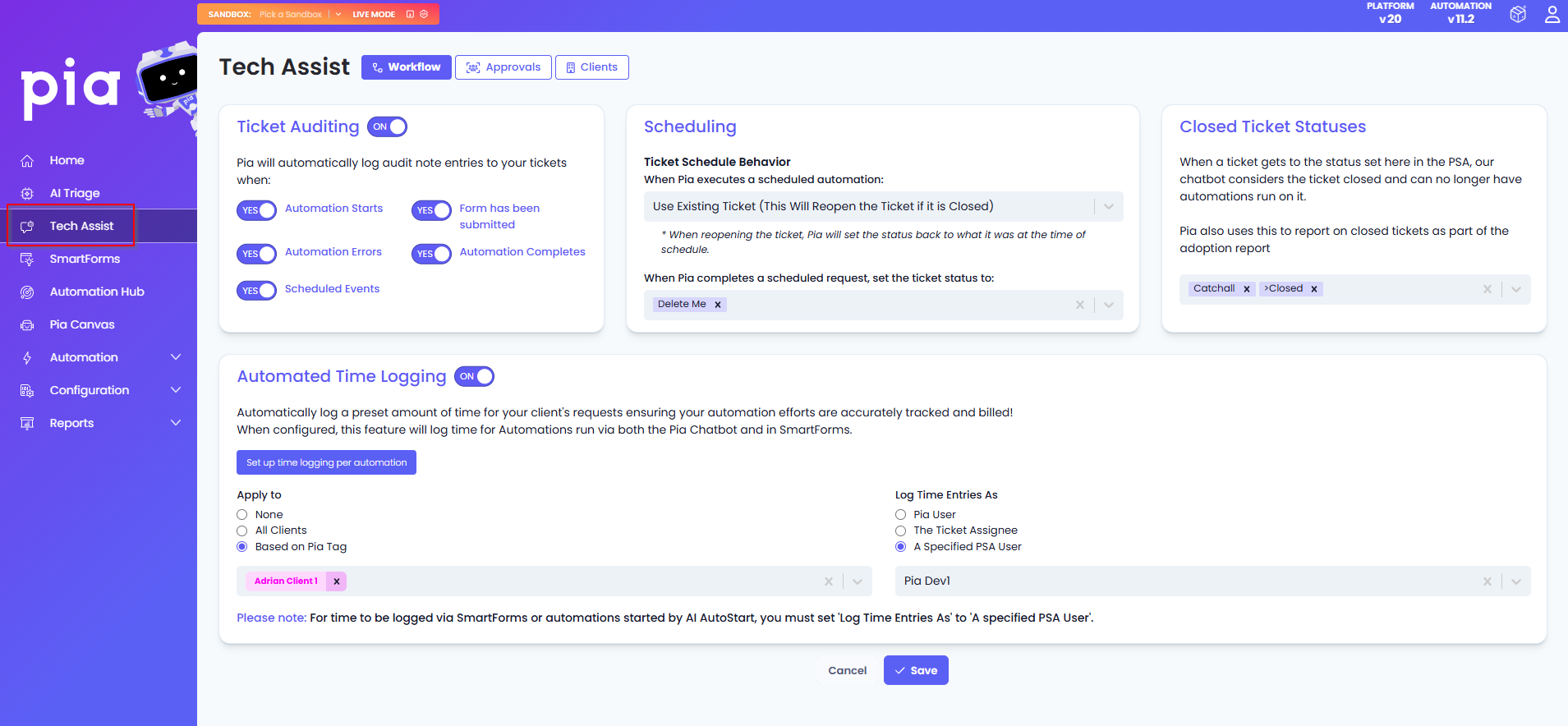
With this release, we are introducing Tech Assist within the Pia Portal. You'll find this on the main menu on the left. Tech Assist was created to centralize all configuration settings required to run your automations smoothly through the Pia Chatbot in your PSA.
Previously scattered options have now been consolidated into one place, making setup within your ticketing system far easier. This new section of the portal also includes new options and features to further elevate your Pia Chatbot experience.
To see the changes, click here. (#27912)
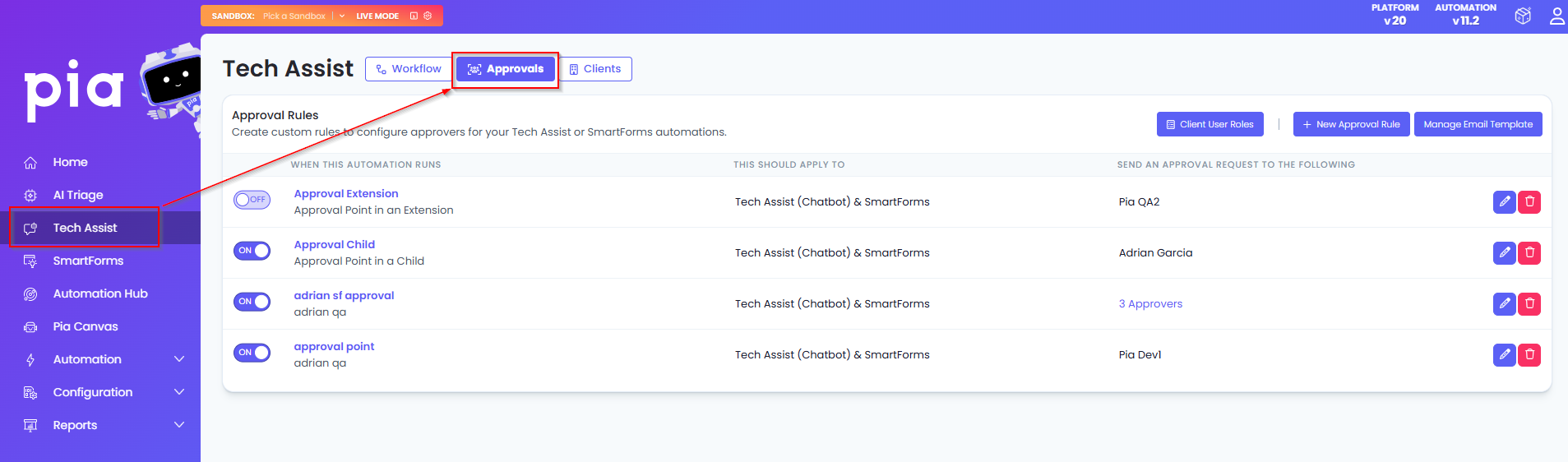
Approvals 2.0: Smarter, Faster & Fully Flexible ✨
We’re excited to launch a major upgrade to Pia’s Approval Feature. Until now, the Approval feature available within the clients screen only allowed you to create and assign approvers within custom automations that you built with limited functionality.
The new approvals feature is a night‑and‑day upgrade compared to what we had before.
You can now create approval rules for both chatbot and SmartForms automations directly from the new Tech Assist screen in the Pia Portal. This enhancement also allows you to:
- Create approval rules for individual users, user groups, synced user or user roles within Pia
- Build multi‑layered approval flows across all pre-built and custom automations
- Easily configure approval for pre-defined points in pre-built automations or create extensions to add your own approval logic if you need more control using the new Approval Point Activity.
The existing approval configuration will remain available until all Partners using the legacy version have been fully migrated to the new Approval Feature. We will communicate more information ahead of time about how this migration will work. For now, the legacy version will continue to be supported.
For more on this feature, click here. (#25651)
New API Launch: 30+ endpoints covering Build, Automate & Configure scenarios ✨
This was an idea submitted by our Partners! #💡
In response to Partner feedback, we’re releasing an API that gives MSPs greater flexibility to build advanced solutions and adapt Pia to their unique workflows.
We're introducing three new API surfaces:
Build: We're releasing API endpoints which will allow you to push and pull Pia automation scripts/code to and from Pia. You may use this to take backups your automations or help make it easier to import automations into Pia.
Automate: Due to popular demand, we are allowing Pia automations to be triggered via API endpoints. Use these APIs to discover/retrieve automations, trigger them and then monitor their executions by downloading their execution logs.
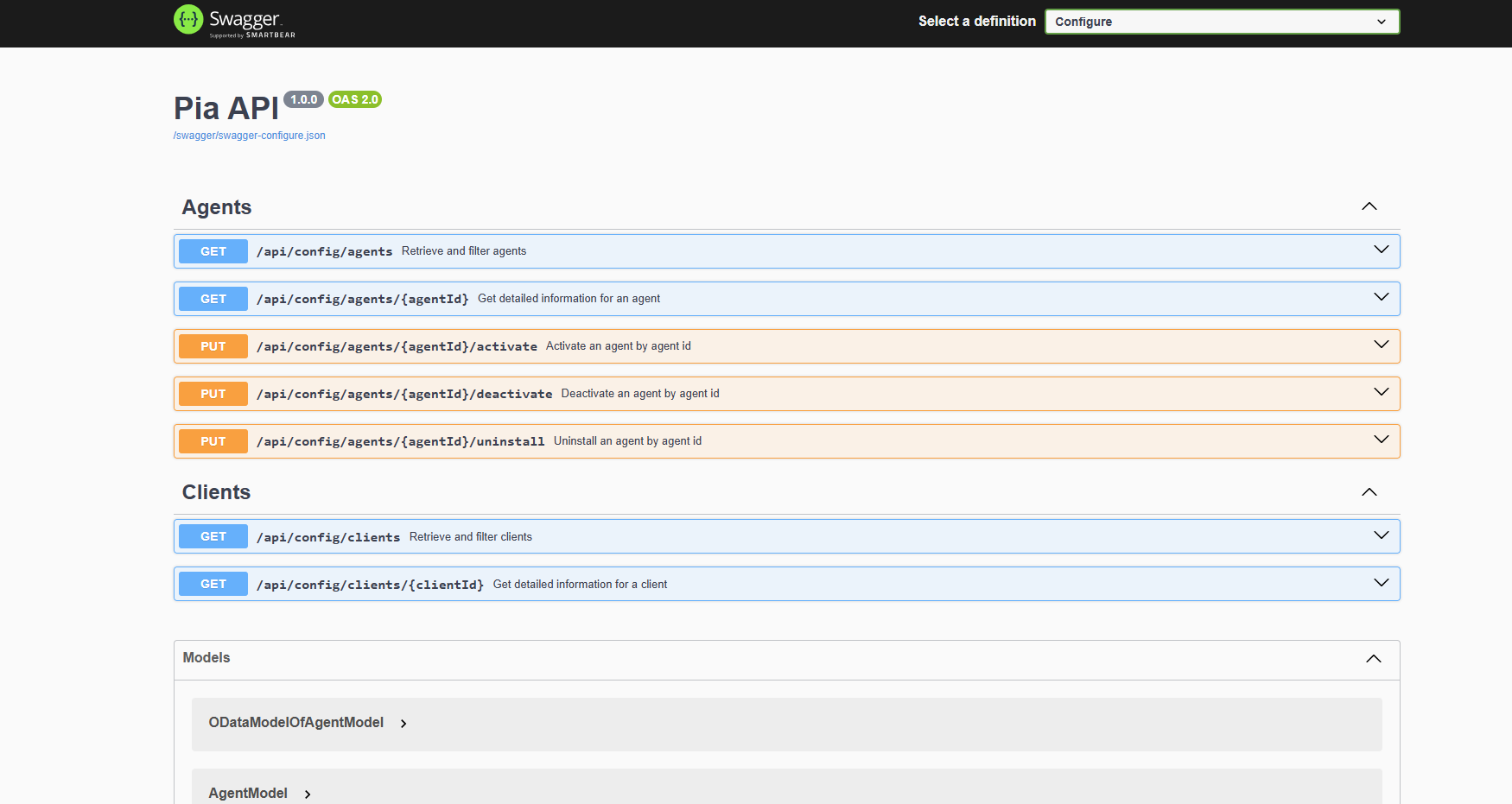
Configure: To make management of your Pia tenant even easier, we are initially launching API endpoints to help you manage Agents with the ability to activate, de-activate and uninstall agents as well as working with clients' information via API.
To learn more about how to setup API access and use the new APIs, read this article (#28801).
To see what API endpoints are available, access these swagger docs here: Build , Automate and Configure.
New Pia Source VSCode Extension ✨
The VS Code extension for Pia Source is now here!
The extension is now available for download through the Visual Studio Code Marketplace offering a faster, more integrated way to manage and sync your Pia automations as part of your everyday development workflow.
Pia Source is a developer‑focused automation tool delivered through a Visual Studio (VS) Code extension. It connects your local Git workflow to your Pia tenant so you can pull, edit, version, and push automation packages using your normal development tools. Pia Source lets developers treat Pia automations like code - stored in files, versioned in Git, and edited in VS Code.
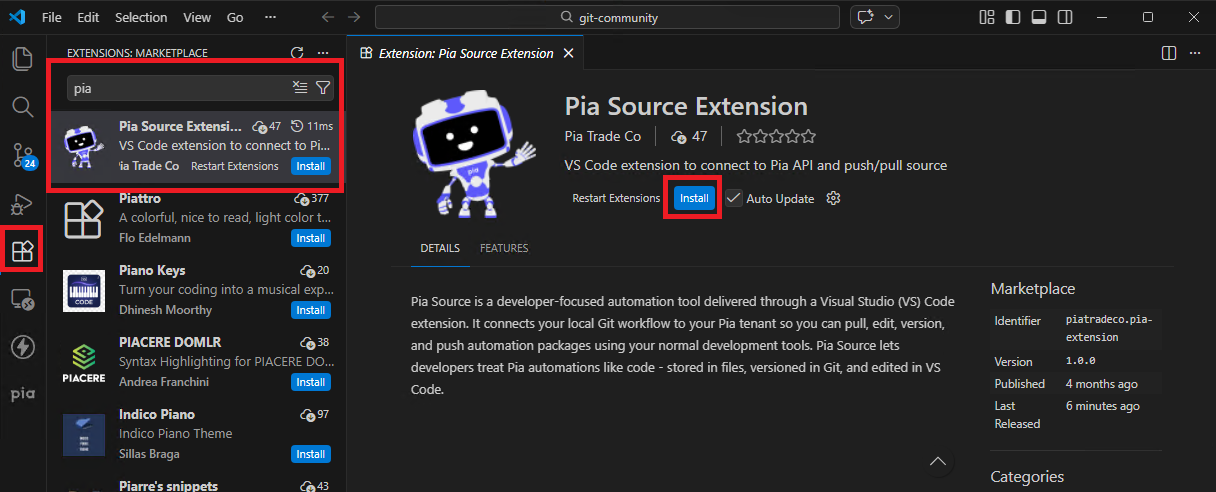
For more information on the installation process of this extension, click here.
Thread Integration Unlocked: SmartForms at Your Clients’ Fingertips ✨
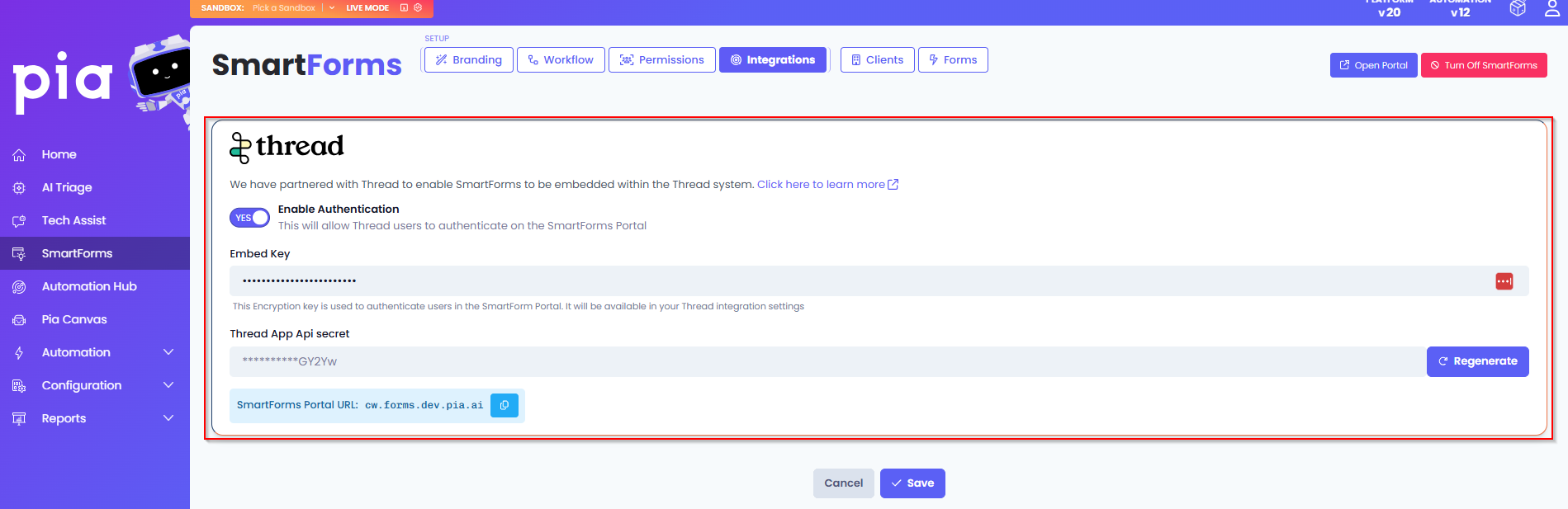
We’re continuing to expand SmartForms compatibility across platforms which has led us to our latest integration with Thread’s Magic Agent. Your clients using Thread can now access SmartForms directly when submitting a request through the Magic Agent without having to log in to the SmartForms Portal.
With this integration, your clients will automatically receive a SmartForms link within their Thread chat whenever a request relates to a SmartForm. These requests will then be processed through your PSA while also incorporating Pia SmartForms Zero Touch Automations.
For more on this integration, click here. (#29055)
Enhanced Ticket Controls for Pia Scheduled Automations ✨
This was an idea submitted by our Partners! #💡
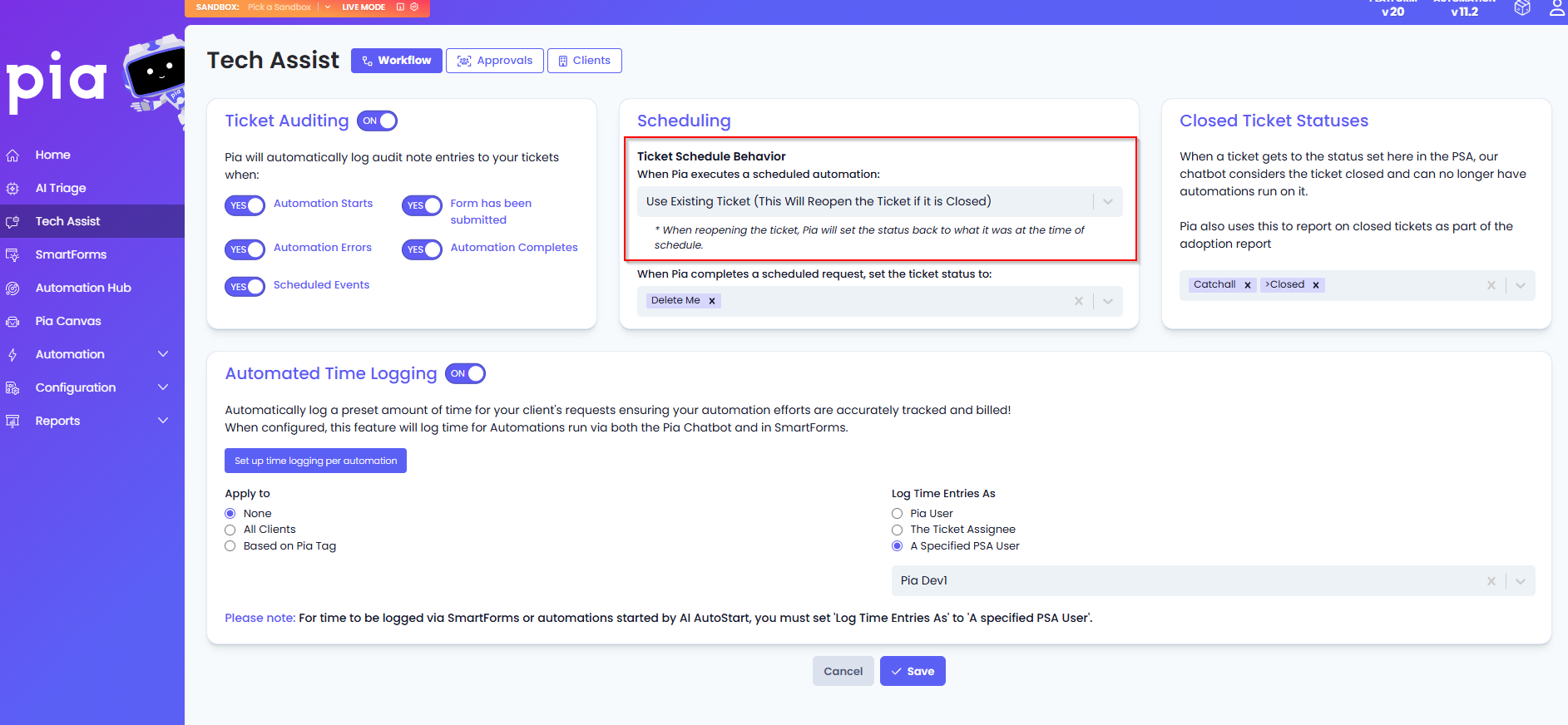
Pia’s Schedule for Later feature allows both built-in automations and custom automations to pause and resume at a future date. When an action is scheduled, Pia generates a second ticket that resumes the automation at the specified date and time. In platforms that support ticket bundling such as ConnectWise and Halo PSA, this new ticket is automatically bundled under the original as a child while in AutoTask, we add a ticket note to link it to the original.
Based on feedback we've had about creating a separate ticket and bundling, we are introducing a couple of new options that provide our Partners with the flexibility to decide how the scheduled automation will interact with either the original ticket request or new ticket created (if applicable). The available options are:
- Create and Bundle – Creates a new ticket and automatically bundles it under the original ticket
- Create without Bundle – Creates a new ticket that remains separate and unbundled
- Use Existing – Reopens the original closed ticket at the scheduled date and time to continue the automation execution (#25623)
For more information on Ticket Scheduling, go to this article.
🌟Further Enhancements
- Published the Pia Browser Extension via the Google Chrome Web Store, see the Pia Browser Extension article for the installation url!
- To support easier troubleshooting, the Pia Portal now displays the current Pia version number. This includes both Platform version and the Automation version your tenant is in. (#25657) (This was an idea submitted by our Partners! #💡)
- Updated the automation scheduling feature so that the ticket audit notes created by scheduled automations now use the Partner’s time zone or time‑zone offset instead of UTC. (#30072)
- Added a new ‘ticket source’ dispatch condition to the AI Triage: Dispatch screen, enabling dispatch rules to be created based on a ticket’s origin. (#28821, #28810) (This was an idea submitted by our Partners! #💡)
- Added a new ‘Source’ option to the SmartForms Workflow: Ticketing Defaults section to allow defining the ticket source for SmartForms tickets. This is available in both global and client‑specific settings. (#27497)
- Added two new client health alerts in the Config Watcher: Health Rules to check for any misconfigured PiaPacks or PiaPacks requiring further setup and to check for bundles that have some requirement that is no longer being met ( i.e. integration, delegate, tag etc.). These health alerts are named as below:
- Pia Automation Hub Integration Configuration Validator
- Pia Automation Hub MS Graph Delegate Validator (#29691)
- Enhanced the SmartForms workflow so that when a SmartForm request is submitted, the initial description or body of the ticket is automatically updated with the information provided in the form. (#24868)
- Added four new user access levels in the Users screen to allow controlled access of the new Automation Hub feature. These access levels are:
- View Automation Hub: Gives the user read only access to the Automation Hub
- Manage Automation Hub: Allows the user to view and perform all actions such as Install, Update and Uninstall PiaPacks within the Automation Hub
- Download to Sandbox: Allows the PiaPacks to be downloaded to a Sandbox
- Publish to Live: Allows the user to publish the PiaPack directly in live mode (#29048)
🐛 Bug Fixes
- Fixed an issue that caused special characters to be stripped out when applying a Ticket Agreement via the AI Triage feature. (#28663)
- Fixed an issue that prevented scheduled actions from being automatically cancelled when an automation was unpublished. (#27144)
- Fixed an issue in Halo PSA where the Triage stamping rules failed to assign the correct Ticket Type and Category when a partner configured all of their categories under Category 3. (#29187)
🔍 Early Adopters Feature Update
You are up to date! All of our features have been made generally available.
What's coming next! 🌟
Your feedback matters to us! 💜 🛠️ We're here to address any issues or suggestions you have, just drop us a line at
partner-support@pia.ai for assistance.#💡Got ideas to enhance our platform? Share them at ideas.pia.ai and shape the future of Pia aiDesk!
⚙️ Ready to supercharge your automation journey?
Your Partner Success Manager is your go-to person.
Reach out to them to explore custom automation possibilities and optimize your journey with Pia aiDesk.
Let's make AI and automation magic together! 🚀