⬆️ We expect most of the rollout to be completed by first week of September. There’s no need to refresh your Pia tenant, you’ll automatically receive an email with the Release Notes as soon as the latest version becomes available to you.
Enhancements 🌟
- Implemented the functionality to enable secure access for external contractors and partner organizations without requiring tenant-domain email accounts by allowing authenticated SmartForms Portal users to access tenant environments regardless of their email domain, provided they have been granted the required permissions. (#32250)
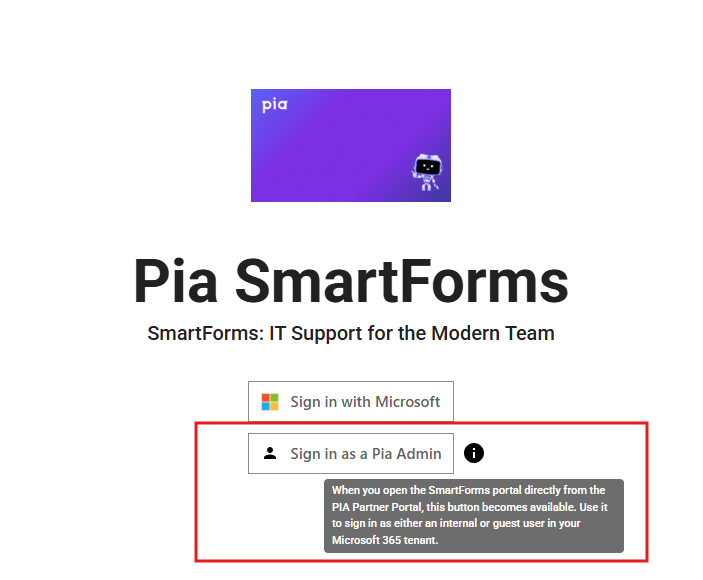
In order to get to this page, go to your Pia Portal and click on Engage>SmartForms and click on the 'Open Portal' button.
Note: The Sign in as a Pia Admin button will not display for your clients.

- Updated approval request expiry messaging to present expiration timeframes in a more intuitive and user-friendly format. (#32615)
- Enhanced dropdown autocomplete filtering to provide more accurate search results and prevent duplicate values from appearing in suggestions. (#32828)
- Optimized Tenant Health processing to better manage concurrent health checks, reducing unnecessary database activity and improving application stability. (#33014)
- Updated the schedule for later feature with a maintenance job to send email notification if scheduled package runs over an hour. (#33182)
- Added support for automatically populating required fields when creating tickets for Halo PSA partners. (#32825)
- Added in the ability for AutoTask users to open the Pia extension within the Ticket Edit window for existing tickets. (#32414)
- Removed the column length constraint on Integration Definition Variables allowing default values longer than 200 characters and aligning them with existing Integration Configuration capabilities. (#32487)
- Added notifications for engineers who have interacted with SmartForms that execute a Schedule for Later action alerting them if the package continuation fails. For Zero Touch executions, notifications are sent to all Pia Portal administrators. (#32602)
- Implemented the ability to set expected audit formats for writing audit notes to the ticketing system. With this change also comes a new platform variable ($display_date_format) which can be used in custom automations to convert DateTime into a more suited format. Current formats include:
- "dd/MM/yyyy",
- "MM/dd/yyyy",
- "dd MMM yyyy" (#29883)
- Updated the Adoption Report so tickets processed by ticketing_system condition automations are no longer counted as completed by Pia. Tickets with a confidence score above 60% are now classified as missed opportunities, unless an automation was executed via AI Auto Start, in which case they remain classified as completed by Pia. (#30201)
- Added support for optional integration variables allowing activities to rely on internally resolved default values without requiring user input for every integration field. (#30730)
- Adjusted AutoTask time-entry note override implementation to use tenant settings service while reverting unintended shared ticketing base signature changes. Behaviour remains scoped to AutoTask time logs. (#31001)
- Improved the reliability of CloudRadial embedded SmartForms sign-in and reduced email mismatch-related access issues by:
- Enhancing iframe authentication failure handling with a CloudRadial-specific retry and reload experience.
- Preserving retry context to enable reliable and deterministic CloudRadial SSO re-authentication in embedded mode.
- Updating ConnectWise SmartForms user synchronization to prioritize the default email address (defaultFlag) before fallback logic, reducing incorrect alias mappings after contact merges. (#32011)
- Hardened activity and package promotion logic so all matching live rows for an activity static name are demoted, preventing multiple live/published rows from persisting by adding a deployment cleanup script to remove legacy duplicate live activity rows and normalize live flags. (#33320)
- Improved safeguards have been added around Ticketing System configurations to help prevent accidental changes that could impact existing Pia integrations or migration processes. (#29761)
Bug Fixes 🐛
- Fixed an issue affecting some AutoTask partners where Pia Chat was not automatically appearing in Microsoft Teams for newly synced users when Pia Chat access was enabled in the Partner Portal. Users could still manually add Pia Chat from Teams, but automatic deployment was not occurring as expected. (#32864)
- Fixed an issue that prevented approval request links from automatically expiring once the associated request had been approved. (#32960)
- Fixed a performance issue in the Live Packages View that caused slow loading times by retrieving large volumes of unnecessary partner data. (#32964)
- Fixed an issue where starting an automation from the package options list could fail due to stale chat response linkage. Package starts from that list now avoid reusing old response-linked package mappings, preventing duplicate/invalid execution state. (#32985)
- Resolved an issue where internal AutoTask ticket IDs could be displayed to end users in Teams and Pia Chat interactions. The system now consistently uses public-facing ticket reference numbers across conversations, ticket confirmations, chat titles, and ticket history views. (#33016)
- Fixed an issue that caused the Engage screen to display a Pia Chat licensing warning even when Pia Chat had been enabled for the partner. (#33035)
- Resolved an issue where the ticket.territory.name expression in Ticketing System condition filters was not evaluating correctly and preventing affected automations from executing as expected. (#33052)
- Fixed an issue where welcome emails could be sent from an outdated delegated Microsoft account after KB re-consent. KB re-consent now triggers distributed consent-token cache refresh, aligning behaviour with Connected Services re-consent. (#33055)
- Resolved an issue where Pia Chat was showing system generated external notes from AutoTask to end users. (#33056)
- Resolved an issue in Pia Chat where uploading an image larger than 4 MB could lock client-specific branding settings, preventing users from editing the profile icon. (#33098)
- Fixed an issue where non-synchronized users authenticated through Microsoft Teams were not presented with available SmartForms. (#33112)
- Fixed an issue where the installing Automation Hub PiaPacks to live environment may fail if a conflicting packageInternalId is found. (#33135)
- Fixed an issue where some scheduled-for-later automations could fail to execute and remain in inconsistent state due to database context reuse during error handling. Scheduled package cancel/edit availability is now consistently enforced as future-only and server-driven, and cancel requests now return explicit outcomes when no selected rows are eligible. (#33183)
- Resolved issues affecting Challenge User Identity (O365) PiaPack upgrades (v1 to v2) reducing false update blocks and improving diagnostic logging. (#33204)
- Fixed an issue causing an AutoTask partner to exceed query thresholds due to improper lock handling. (#33211)
- Fixed an issue where expanded activities in Live Packages would automatically collapse during package execution. (#33219)
- Resolved an issue for a Partner where the Pia API was returning agent information incorrectly. (#33222)
- Fixed an issue where Halo PSA time entries were being posted as customer-visible notes. Time log actions are now correctly recorded as internal notes. (#33224)
- Fixed an issue with duplicate message on Pia Chat and Tech Assist chatbot staying in typing state when activity instance creation process run into error. (#33257)
- Fixed a get_ticket_data failure path in ConnectWise integrations where missing/inaccessible company records could cause null-reference errors. Triage now continues with available ticket-level company data, and warning logs are emitted when optional company enrichment cannot be completed. (#33280)
- Fixed an issue where SmartForm data retrieval could fail for extension automations when package activity position metadata was stale. (#32753)
- Fixed a crash in audit note generation for Chat Interaction submissions when form metadata contains missing field-name mappings. (#32786)
- Fixed an issue affecting automation execution via the Pia API where context-specific variables could fail to resolve in certain scenarios. (#32824)
- Resolved an issue where the OneTime Password Extension could fail because the Automation Hub API base URL could not be modified. (#32456)
- Fixed a Config Watcher issue where removed/uninstalling agents could still trigger agent health alerts. Uninstalling agents are now excluded from version checks, and Critical Agent checks no longer report false missing-agent failures when only uninstalling records exist. (#32609)
- Fixed an issue where Date Picker fields configured to default to today's date would persist the save date as the default value. The current date is now applied when the form is rendered in editable mode, while read-only forms display the originally submitted value. (#29508)
- Fixed incorrect Type, Subtype, and Item names and values displayed for AutoTask in Pia Chat and SmartForms. (#30907)
- Resolved an issue where the Pia: Triage V2 automation was timing out during executions. (#31303)
- Resolved an issue where the Function Package: Directory Cloud Sync was timing out during executions. (#31706)
- Resolved a timeout issue that was causing the scheduled task for the Pia: Staff Offboarding automation to fail. (#31838)
- Fixed an issue where secondary automations could fail to execute after clicking "Nevermind" during automation execution in an active chat session. (#31894)
- Fixed an issue where Adoption Report could overcount activated agents for specific clients due to stale reporting ODS agent-client link records. (#32163)
- Resolved an issue where the embedded Pia Tech Assist pod in Halo PSA could fail to load on initial launch. Users previously needed to switch to another tab and return to the Tech Assist tab for the chatbot to load correctly. (#32237)
- Fixed a live Form Editor issue where forms could fail to load for some tenants when Locked tag metadata was missing. (#33318)
- Fixed an issue where clicking
Start Teams Chatmultiple times could create duplicate Teams chats for the same ticket contact. (#33477)
Your feedback matters to us! 💜
🛠️ We're here to address any issues or suggestions you have, just drop us a line at partner-support@pia.ai for assistance.
💡 Got ideas to enhance Pia aiDesk? Share them at ideas.pia.ai and shape the future of Pia aiDesk!
⚙️ Ready to supercharge your automation journey?
Your Partner Success Manager is your go-to person.
Reach out to them to explore custom automation possibilities and optimize your journey with Pia aiDesk.
Let's make AI and automation magic together! 🚀