Welcome to Pia Chat Release Updates 1!
In this release, we are introducing exciting new changes to Pia Chat that will help you get more out of it. This article also includes helpful FAQs from partners and common questions that can guide you through your Pia Chat experience with confidence.
Frequently Asked Questions
What is the difference between the 2 chat experiences in Pia Chat?
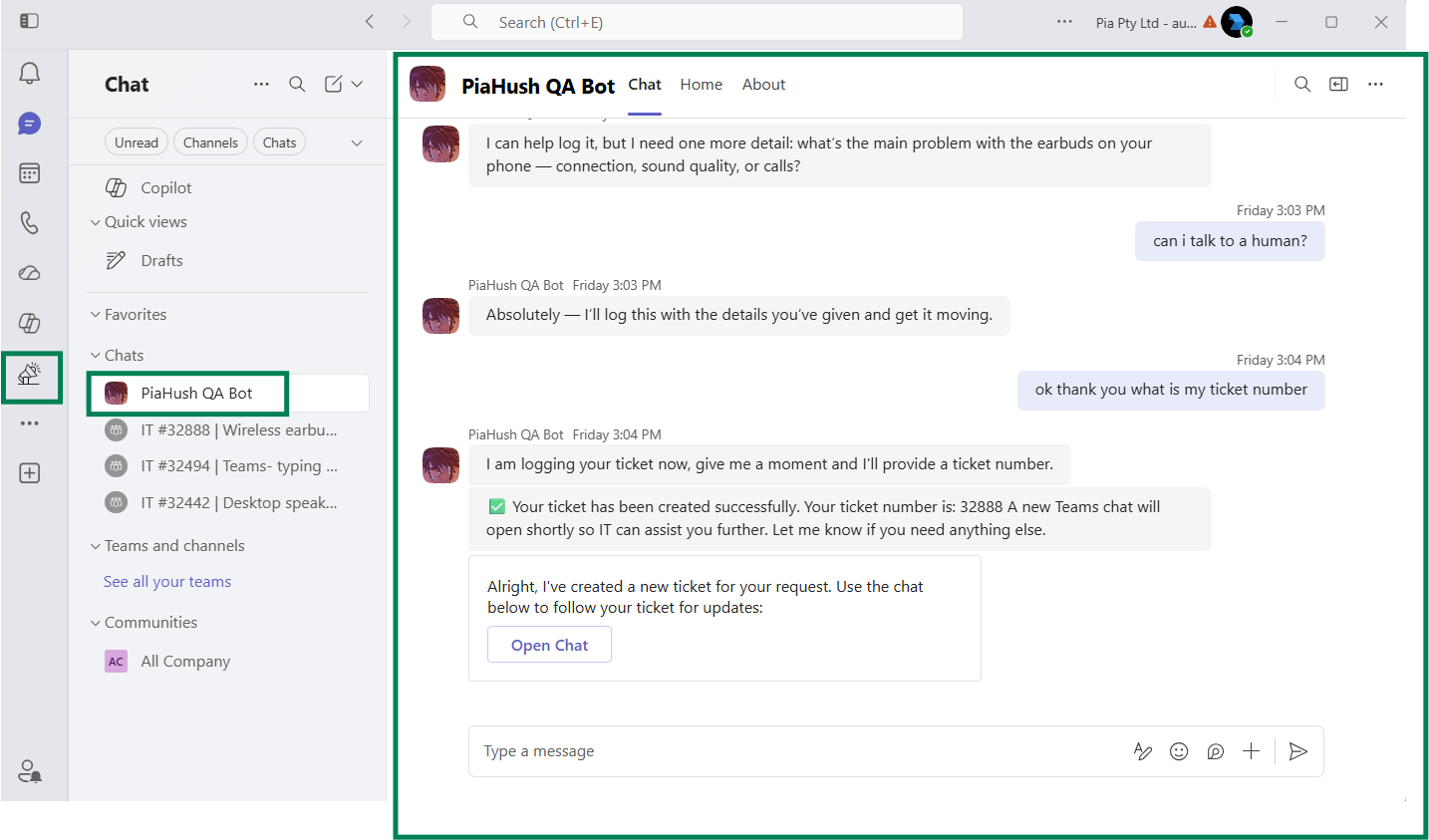
Triage Chat (also referred to as Pia Chat)
Pia Chat is a AI Resolution experience which helps guide your clients request by checking existing open tickets, serving available SmartForms, automating the users request via Automated Actions or, if there is no automated resolution path, Pia Chat will triage and log a new ticket into your PSA on behalf of the user (after asking qualifying questions).
The goal of the Triage Chat is to help the user self-serve their issue with automation or log a ticket if required. This AI experience will not attempt to troubleshoot the issue with the user – as this may not result in a resolution. It’s important to give users a fast path to getting their issue logged so that further steps to resolve the request can take place in the dedicated ticket chat (for now by the engineer chat, but more about AI Troubleshooting below).
Dedicated Ticket Chat
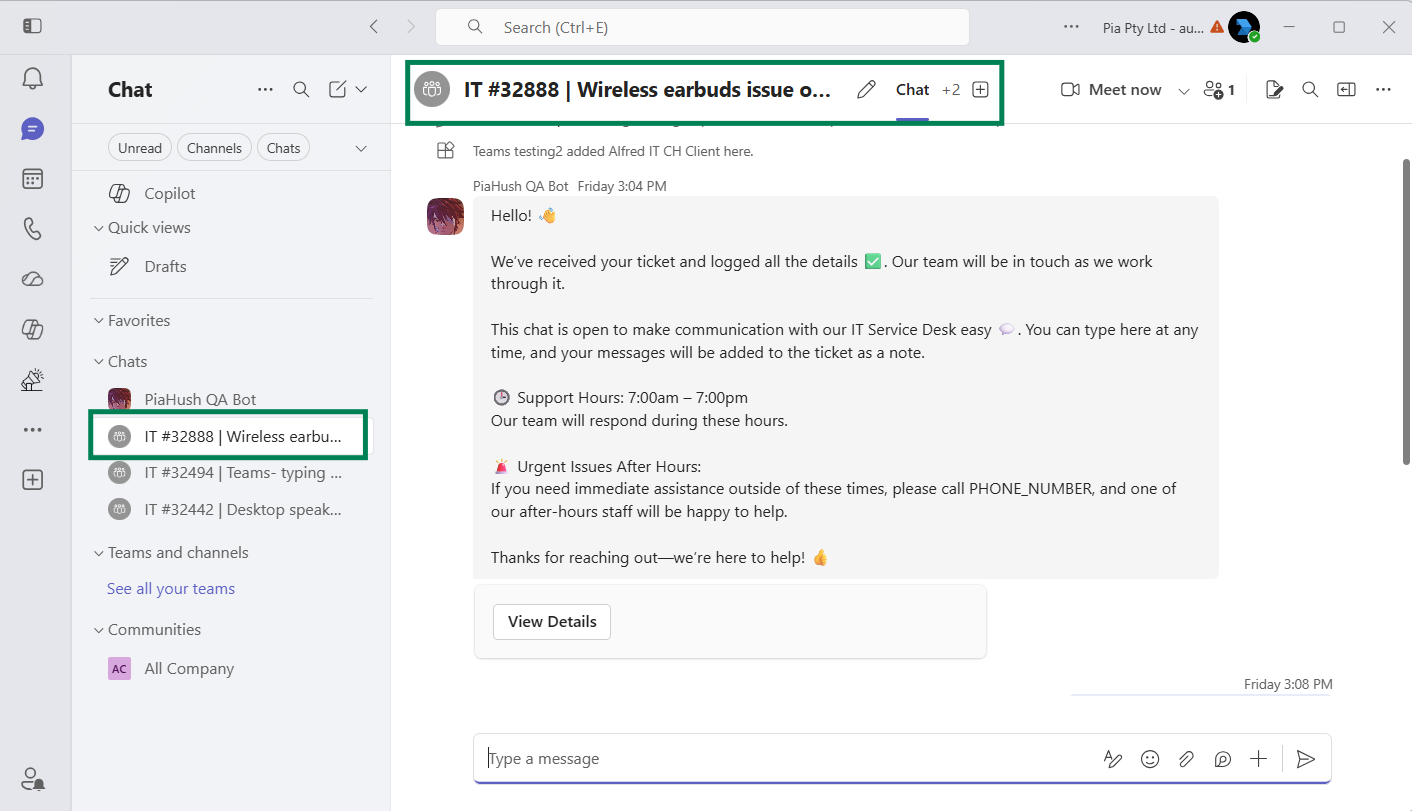
When your clients request is triaged and a separate ticket needs to be logged, Pia Chat will create a dedicated ticket chat. The purpose of the dedicated ticket chat is to facilitate a chat between your engineer (via the Tech Assist window in your PSA) and your client (via Microsoft Teams).
For now, this chat has very limited AI. We do plan on adding a troubleshooting AI to this experience (Planned – Trial Period) which will help your client troubleshoot the ticket while waiting for an engineer to get in touch.
This would look something like: “Your issue has been logged, but while we are waiting for someone to become available, here are some troubleshooting steps you can try – let me know and I can help guide you!
- Step 1
- Step 2
- Step 3 ”.
Pia Chat Enhancements ✨
Customizable Intro Message for Pia Chat
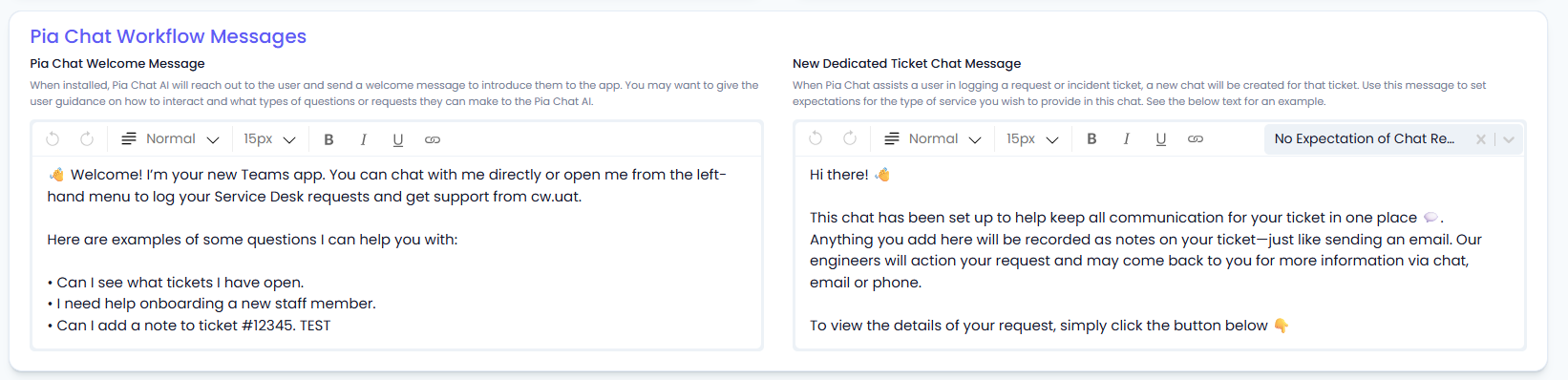
Deliver a more personalized and branded support experience with customizable welcome and ticket chat messages in Pia Chat.
You can now configure these messages globally across your organization (under Engage Workflow screen) with the option to override these settings for individual clients. With this feature, you can set clear expectations with your clients about what level of service they can expect from both Pia Chat (i.e. you can use pia chat to do X, Y, Z) and from your Service Desk (i.e. your request has been logged and an engineer will be allocated, we aim to get back to you within X, Y, Z time frame depending on the priority of the request).
Here is the configuration options including standard templates for dedicated ticket chat message in the Partner Portal:
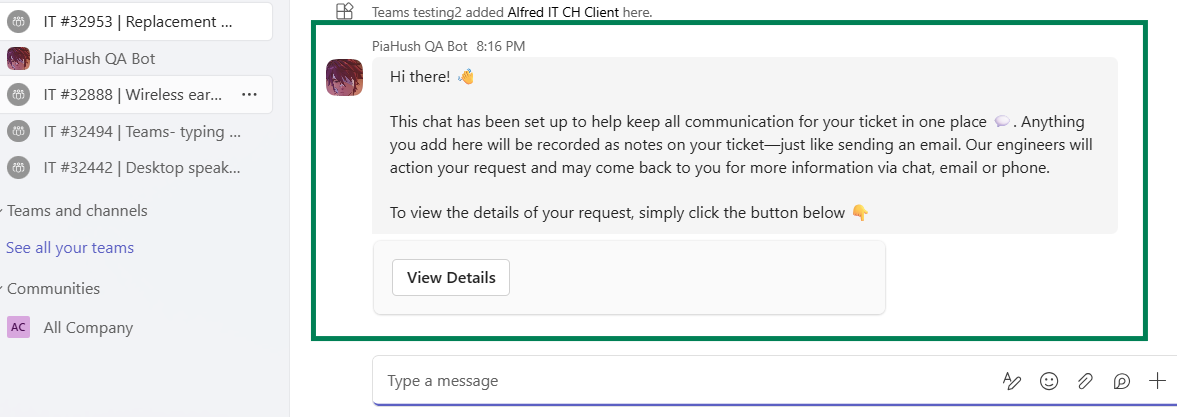
Here’s what it looks like in Microsoft Teams for the ticket chat message:
And for the welcome message when Pia Chat is first installed:
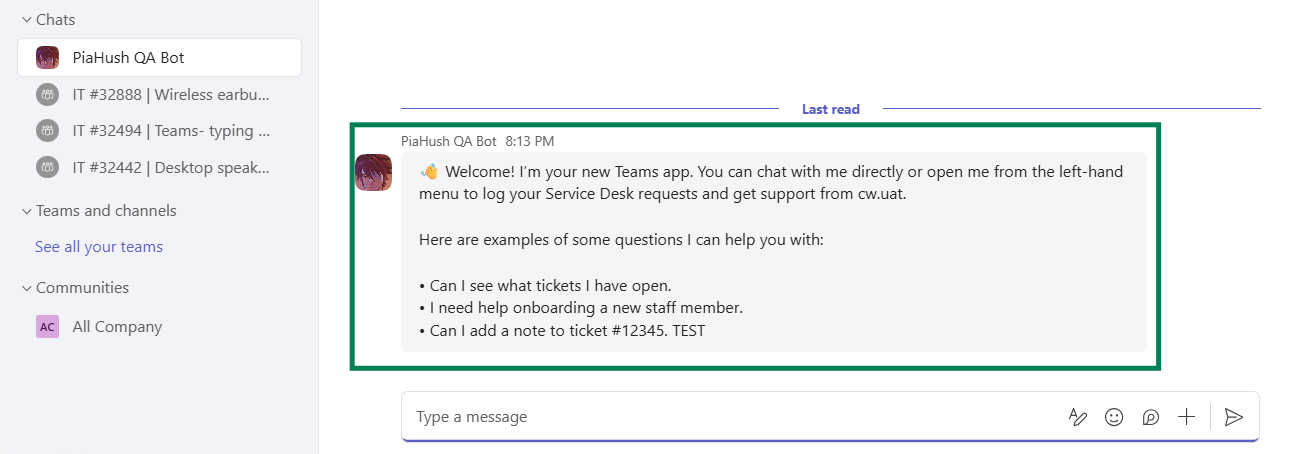
To learn more about these settings, click here (#32151)
Bring Your Custom Automations into the Conversation
Want your automations to interact directly with end users, not just engineers?
We've just added a fully customizable automated action option that executes automations in the user's Microsoft Teams. that allows Pia Chat to execute automations directly within a user's Microsoft Teams conversation. This means users can get help, information, and issue resolution in real time—without submitting a ticket or waiting for engineer intervention.
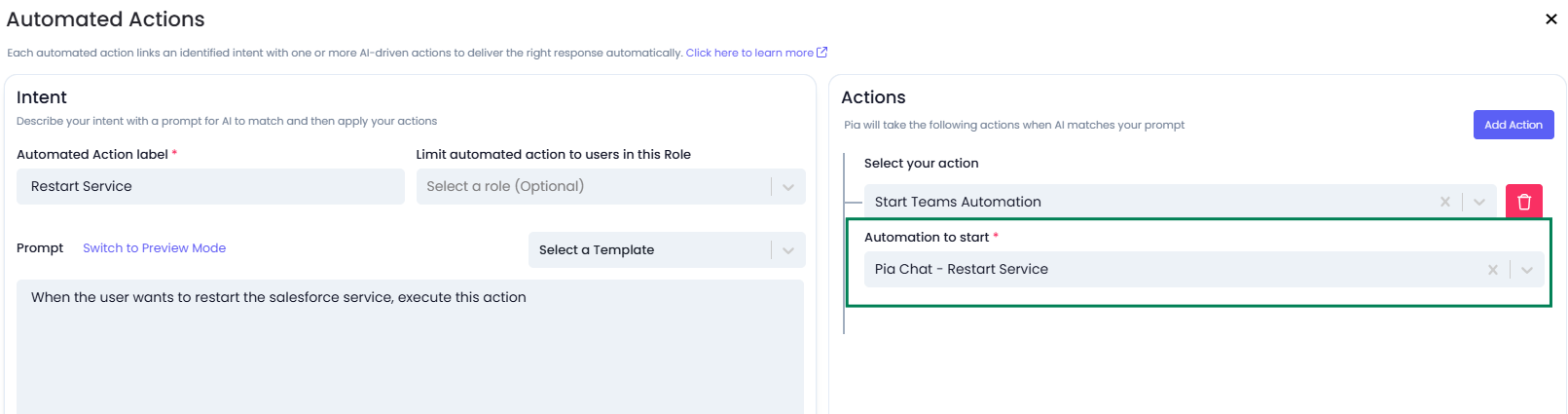
This extra capability will help your automation engineers get the most out of Pia Chat. Here are some development ideas for new automations that you may want to create with Pia Chat:
- Allow your clients to restart a service by executing your automated action. For Example:
“MYOB isn’t working can you help”
“Sure let me restart that service for you” - Retrieve knowledge to help guide the user on a particular topic. For Example:
“I’m having trouble with using my receipt printer”
Pia Chat can execute your automation and have it retrieve information from a knowledge source (such as IT Glue) and feed it back to Pia Chat’s resolution AI which can then guide the user using the information provided - Provide the user with a way to retrieve information from their environment, perhaps in a report. For Example:
“Can I please have a list of all licensed users from office 365?”
Pia Chat can execute an automation, gather the required data, and return the results directly to the user.

Don't have automation development capability?
Not to worry! We will be building some of these automations in our future release which you will be able to access via the Automation Hub.
For more information on this feature, click here. (#31239)
Enhanced Pia Chat Installation Experience
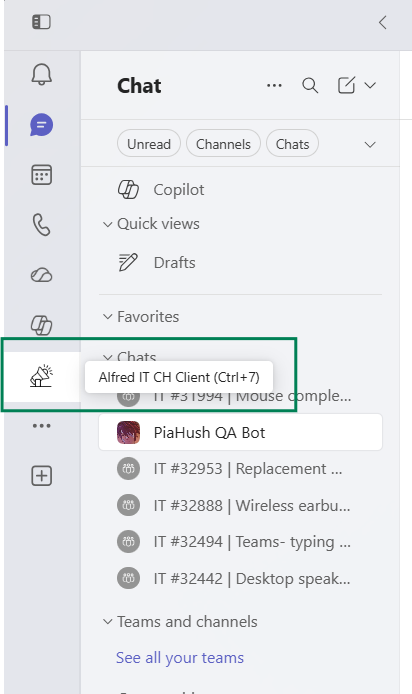
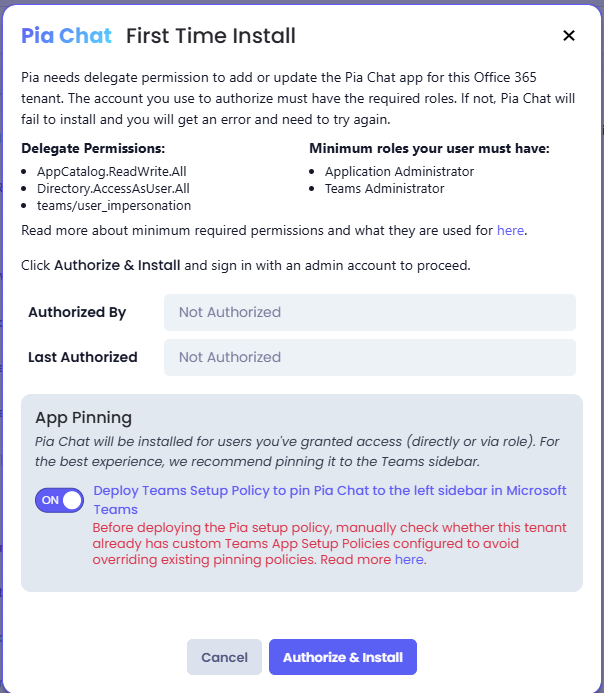
We've introduced a new option during Pia Chat installation that allows you to choose whether Pia Chat should be pinned to the client's Microsoft Teams sidebar automatically.
Pinning Pia Chat makes it easier for users to access their AI Resolution Assistant and view notifications without needing to search for the app. Because some organizations already have Teams app setup policies in place, this setting is now optional rather than being applied automatically.
The installation experience has also been improved to:
- Highlight when custom Teams setup policies already exist.
- Allow app pinning settings to be managed after installation.
- Provide clearer error messages when required Teams Administrator or Application Administrator permissions are missing. (#32657)
For more information on Pia Chat Installation requirements, click here.
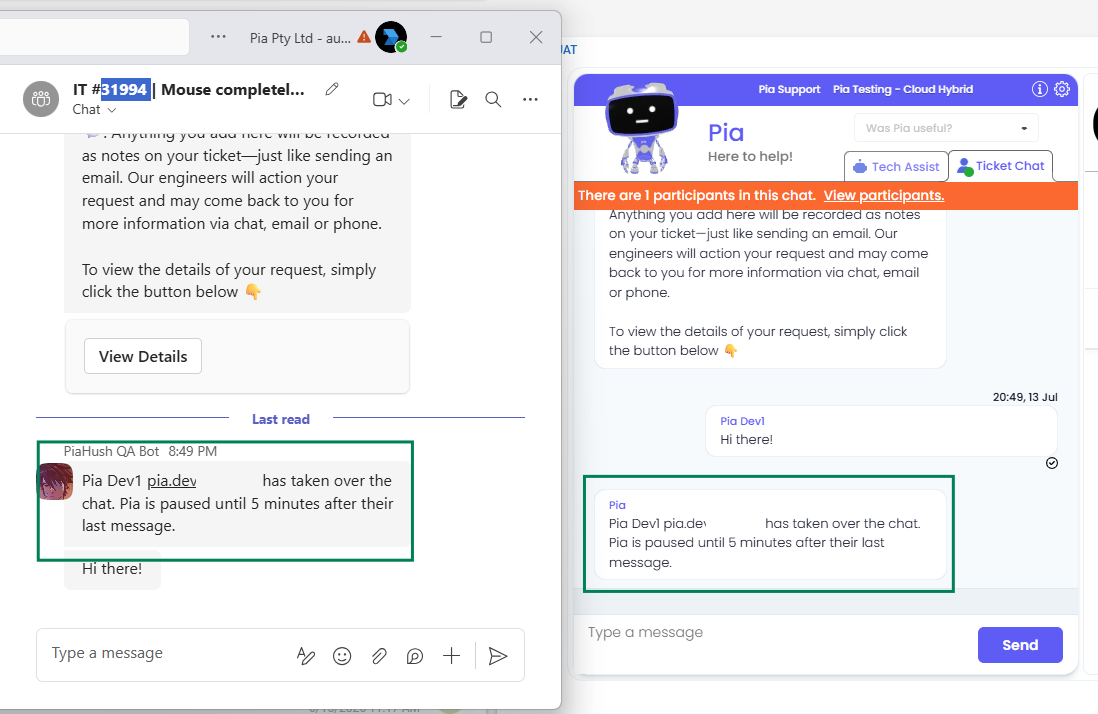
Know When an Engineer Takes Over
Pia Chat now notifies users when a support engineer joins the conversation, providing greater transparency and a smoother support experience.
This enhancement helps users understand when their request has transitioned from automated assistance to direct engagement with a Service Desk engineer, ensuring clear communication and improving confidence that their issue is being actively managed. (#32506)
Improved Chat Experience
With this release, we're introducing several enhancements to the Pia Chat experience to make conversations more intuitive, transparent, and engaging for both end users and support engineers.
- AI Typing Indicator: Users will now see an "AI is typing" indicator in Microsoft Teams while Pia is generating a response, providing real-time feedback that their request is being processed.

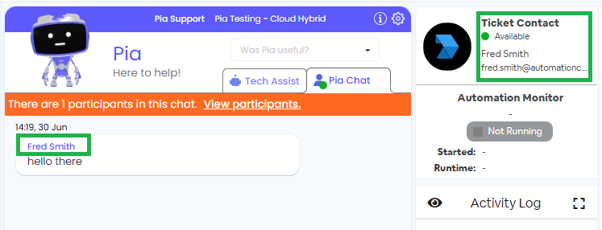
- Enhanced Context in Tech Assist: Client names are now displayed alongside each message in Tech Assist, in addition to the existing client information shown in the top-right corner, making it easier for engineers to identify and manage conversations.
Upcoming Features
Here is a set of questions we got during early release Program which have updates coming:
Can my clients close a ticket without engineer involvement using Pia Chat in Microsoft Teams?
We have a feature (Planned – Trial Period) for this. The intention here is to allow users to say that they no longer have an issue anymore / their issue has been resolved so they can self-close the request. This option will be available in the ticket chat feature.
For the core Pia Chat (Triage Chat) experience, you can also solve this right now by creating an automated action to set the status of a ticket and log a note to it.
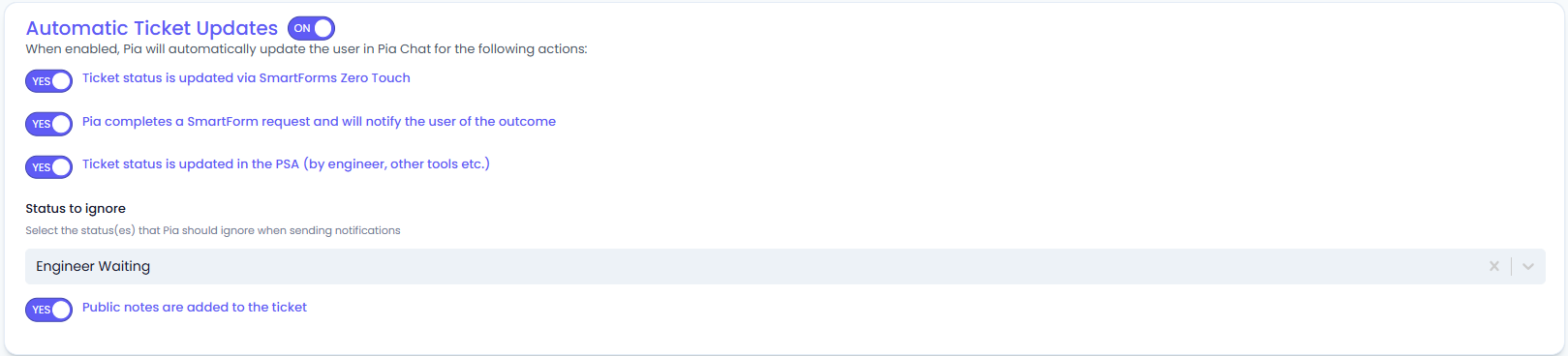
Does Pia Chat Update Clients when the Status of a Ticket Changes?
We have a feature (Planned – Trial Period) for this which will post status updates to tickets into the ticket chat within Microsoft Teams for certain status updates – you will be able to control which statuses will trigger these updates.
We will also include a few more status updates which will give your clients up to date information, here is a preview of what those options look like:
Where can I go to see all Pia Chat logs across all of my clients?
Right now you can see the ticket chat in each ticket in your PSA via the Tech Assist window:
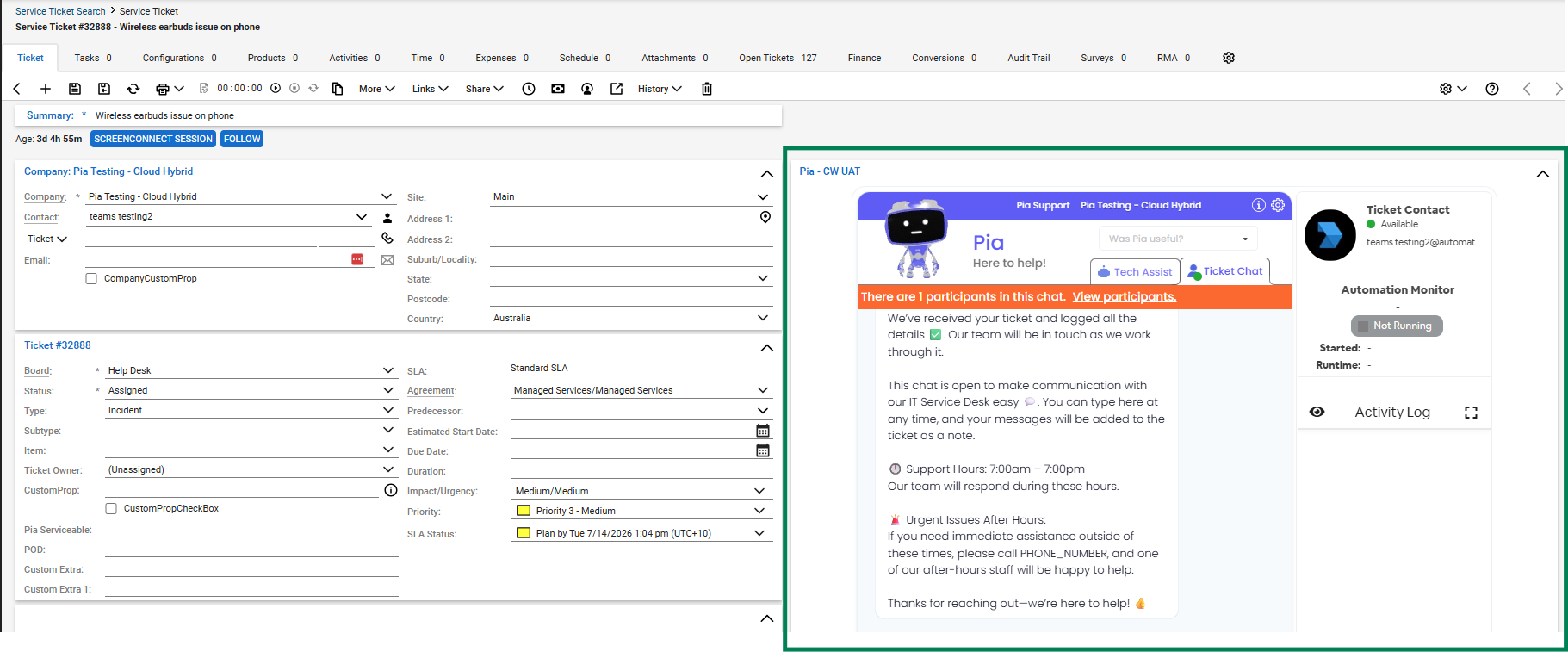
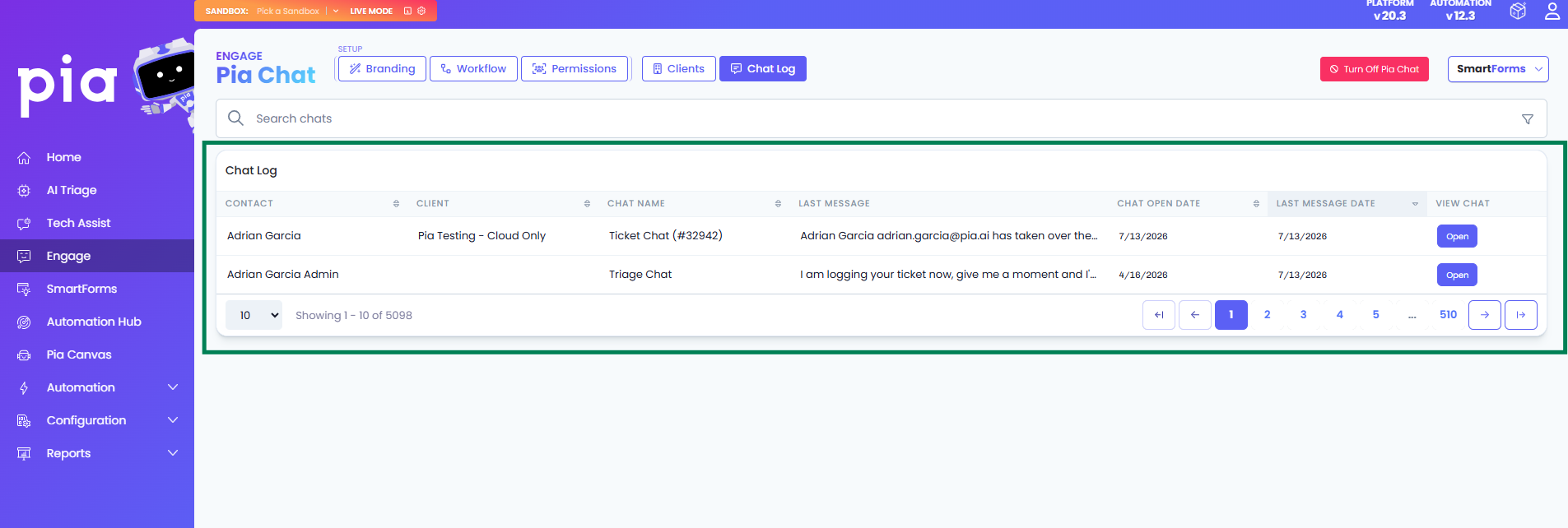
Pia will copy the details of any requests logged into the Triage Chat within Pia Chat experience. However to see full details of all Triage and Dedicated Ticket Chats, we have a feature coming called “Chat Log” (In-Development).
Here is a preview:
The Forms option in Pia Chat shows a list of available SmartForms – but I want my users to be able to see open tickets in a list view
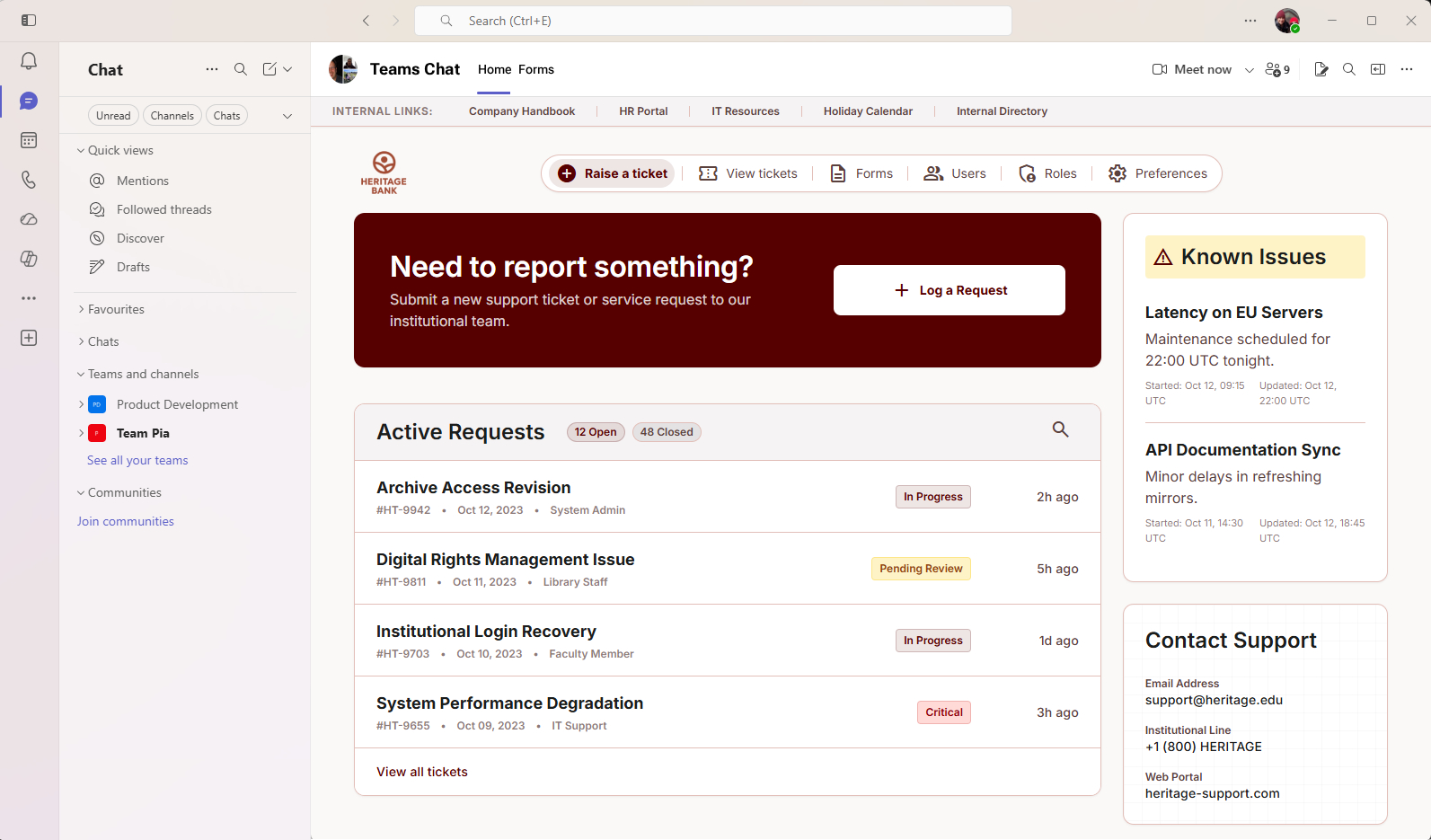
We have been working on an update to this experience (Planned – Trial Period). We want Pia Chat’s Home tab experience to be a single point of engagement for you as an IT Help Desk right in Microsoft Teams where your clients work.
If you have existing ticket portals, reports or other links, you can use the link bar at the top.
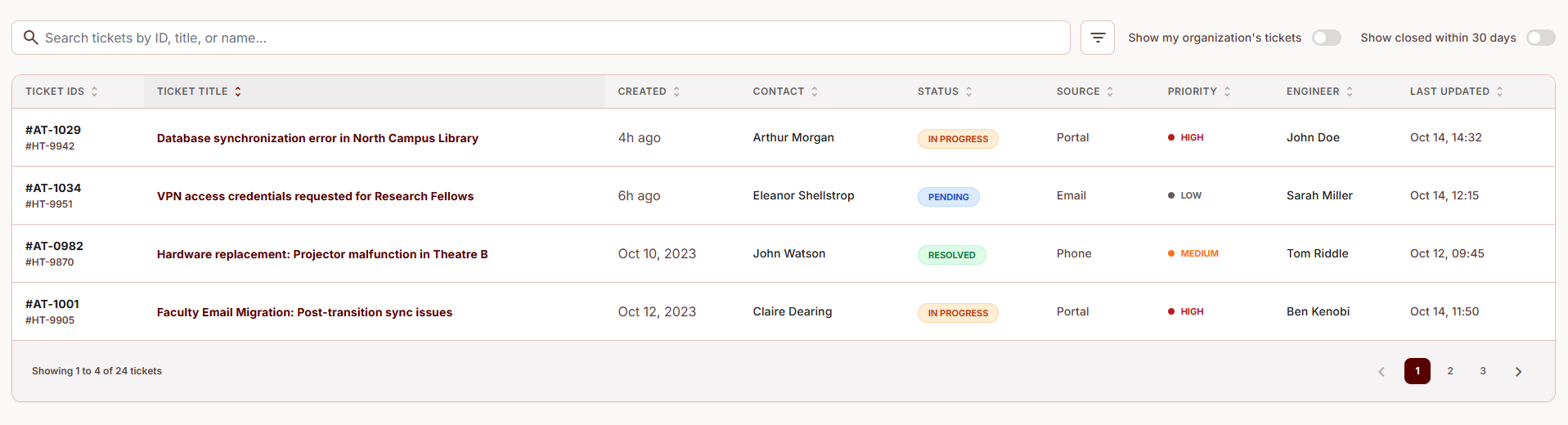
In addition to that, we are launching a way for your clients to view a simple list of open tickets and closed tickets in past 30 days. We will also have a feature to help Organizational Admin’s who need to view tickets across all staff for your client’s business, rather than just their own tickets and a known issues option to help you manage existing outages and avoid users logging the same issues multiple times.
See below for how this experience will look in Microsoft Teams:
Here’s an example of what the “View Tickets” feature will look like, showing a filterable table of tickets:
Can I talk to a human?
We are adding a bypass for when your client requests to speak to a human to log a ticket immediately and let the user know that someone will be in touch with them (Planned – Trial Period).
Release Notes
Platform 20.3 (2026-06-30) This update is part of a broader platform release which Pia Chat patches were a smaller component of. The next update (Platform 20.4) is entirely Pia Chat focused and will have key new features.
- Name of the app will use business name for pia chat app in ticket chat
- Resolved issue with role sync not triggering updates to install teams app for newly adding users
- Improved required field checks for when configuring pia chat before allowing installation to client
- Updated Pia Chat to use GPT 5.4-mini AI Model (GPT 5.2-chat model is now obsolete)
Platform 20.2 patch-14 (2026-06-15) A huge step forward for custom development via Pia Chat. We've improved the chat experience again for your clients to make it more stable and robust.
- Major Progress For Pia Chat Custom Automation Development: We've released an early version of custom teams automations -> you can now create a custom automation and run it via Pia Chat, see the video here:
- We have improved support for when a participant of the teams chat removes themselves / leaves the chat
- Better support for failure scenarios in case Pia Chat is unable to log a ticket to your PSA on behalf of your client
- The view ticket details feature in the ticket chat has been updated to display email notes more reliably and better show which notes came from email vs. chat
- Improved the experience in the Pia Chatbot when presence information was unable to load for the ticket contact due to authorisation or when the contact email could not be found
Platform 20.2 patch-13 (2026-06-01) You should notice more consistent behaviour when using Pia Chat to switch between the triage chat and the dedicated ticket chat and general improvements to stability. We also focused on rounding out support for Halo and AutoTask support to get all PSA's up to the same standard.
- Improved support for ticket retrieval by contact for Autotask when done via Pia Chat
- Fixed an issue with dates returned in Halo PSA where timezones were not being converted correctly, resulting in times displayed in view ticket details in Pia Chat being different to that which was displayed in Halo
- Added support for Halo PSA ticket retrieval and show correct ticket id instead of system generated id
- Resolved an issue with Halo PSA notes being displayed whereby internal system notes which are not relevant to the user are now hidden
- Added functionality to automatically create a ticket chat if missing when using an automated action to create a note on a ticket (useful for tickets which were logged via email but the user is requesting action to be take on those tickets)
- Improve reliability of teams install to check that the authorised delegate token has the required permissions after authorisation and re-obtain a token / expire cache if required
- Add additional validation for enabling Pia Chat on a client and display message explaining what setup is missing
- Improve reliability of Pia Chat AI tool calling in scenarios where multiple tool calls are required
Platform 20.2 patch-7 (2026-05-27)
- Fixed an issue whereby messages from Ticket Chat were not posting into Microsoft Teams, this same issue also caused a problem with ticket id and "Open Chat" button not being sent to teams chat after ticket creation in Pia Chat experience. This occurred due to an issue with how we handle office365 tenant Id in this scenario, so was not picked up in Pia Test environments until partner reported symptoms
- Added Halo PSA support for selecting "ticket type" for ticket creation via Pia Chat as this is a minimal required field for ticket creation in Halo
- Added better retry and error handling behaviour for when new teams chat is created and first message is posted into the chat - a timing error which could previously occur where we did not receive a chat creation event with conversation URL in time from Microsoft prior to attempting to send the chat a message has been resolved
- Updated experience for when using an automated action to "Add a Note to a Ticket" which now also posts a message into the Ticket Chat so that its easier for the user to keep track of and follow updates.
- Fixed an issue with welcome message in Ticket Chat not being added correctly when ticket is created via Pia Chat
- Added global handling for 429 throttling of teams bot send messages to teams chat conversation as Microsoft have fairly aggressive restrictions on spamming teams chats
- Cleanup the teams app installation settings box to only allow install/reinstall/uninstall actions to occur if the state of the app installation allows it. Also hide the version as this is confusing to the user and not helpful
- Prevent Log a Ticket and Add a Note from being used in the same automated action as they are mutually exclusive
- Fix page titles for Pia Engage / Chat pages in the Pia Partner Portal
- Fix loading and display logic in the Teams Workflow settings page to prevent glitching of selected options
- Add additional cache bust events for when settings change on the teams workflow page - changes for custom links and some other options should now update immediately on SmartForms
- Resolved an issue with Tech Assist activity log causing a memory leak when running many automations in the same page without refreshing
Platform 20.2 patch-6 (2026-05-14)
- Patch Tech Assist to fix a width overflow issue in ConnectWise Embed, causing Tech Assist layout to break
- Add failure handling to ticket creation process to retry with a back off and in case of eventual failure, an error will be returned to the user in the chat so they are not left hanging
- Resolve issue with Autotask support for contract type filtering to obtain tickets by contact
- Update default settings values for teams app branding icon for first time setup
- Add real-time polling to teams app installation to show progress during install
- Add error handling for ticket history feature to improve stability during load of the "View Details" button in teams ticket chat
- Improve reliability of identifying user's when matching teams user with SmartForms User to use AAD ObjectId instead of email address
- Add teams ticket chat during submission of SmartForms via teams triage bot similar to how ticket chat is created when a chat is generated via the pia chat triage agent directly
- Added security constraints to all built in tools to validate the required users and ensure that AI cannot generate tools by impersonating other users (e.g. getting a list of tickets for a company or contact for which the current user does not have access)
- Added better security cache handling for teams bot session authentication to prevent timeout and expiry of session which was occurring every 10-15 minutes causing Pia Chat to become non-responsive
- Added a friendly response for Pia Chat for users who have the teams app installed but where the MSP has disabled the use of Pia Chat "Your MSP has disabled Pia Chat"
- Fix an issue with messages from Ticket Chat not being saved as ticket note on the ticket
- Fix an issue with the welcome message for Ticket Chat (i.e. Engineers first message when creating a new teams chat for an existing ticket) not being saved as a note on the ticket
Platform 20.2 (2026-04-30)
- Automated Actions with custom prompt intents are now available under workflow settings
- AI in the ticket chat experience
- Allows the customer to request status update and add notes to tickets within the ticket chat directly
- Engineer to customer chat via the pia chatbot
- Ability for engineers to talk directly to customers directly in the PSA ticket which will reach out to them via the Pia Teams Bot
- Workflow setting now added for recording conversation in ticket chat to the ticket
- Easier setup process for installing the app when toggling on
- New UI for Pia Engage menu with SmartForms and Pia Chat separated out
Your feedback matters to us! 💜
🛠️ We're here to address any issues or suggestions you have, just drop us a line at partner-support@pia.ai for assistance.
💡 Got ideas to enhance Pia aiDesk? Share them at ideas.pia.ai and shape the future of Pia aiDesk!
⚙️ Ready to supercharge your automation journey?
Your Partner Success Manager is your go-to person.
Reach out to them to explore custom automation possibilities and optimize your journey with Pia aiDesk.
Let's make AI and automation magic together! 🚀