Welcome to Pia Chat Release Updates 2!
You've shared your feedback and we've been hard at work enhancing Pia Chat. Over the last few months, we're built new features designed to simplify ticket management and improve document sharing, making it easier than ever to get things done.
Here's a quick look at what's new!
Frequently Asked Questions
What is the difference between the 2 chat experiences in Pia Chat?
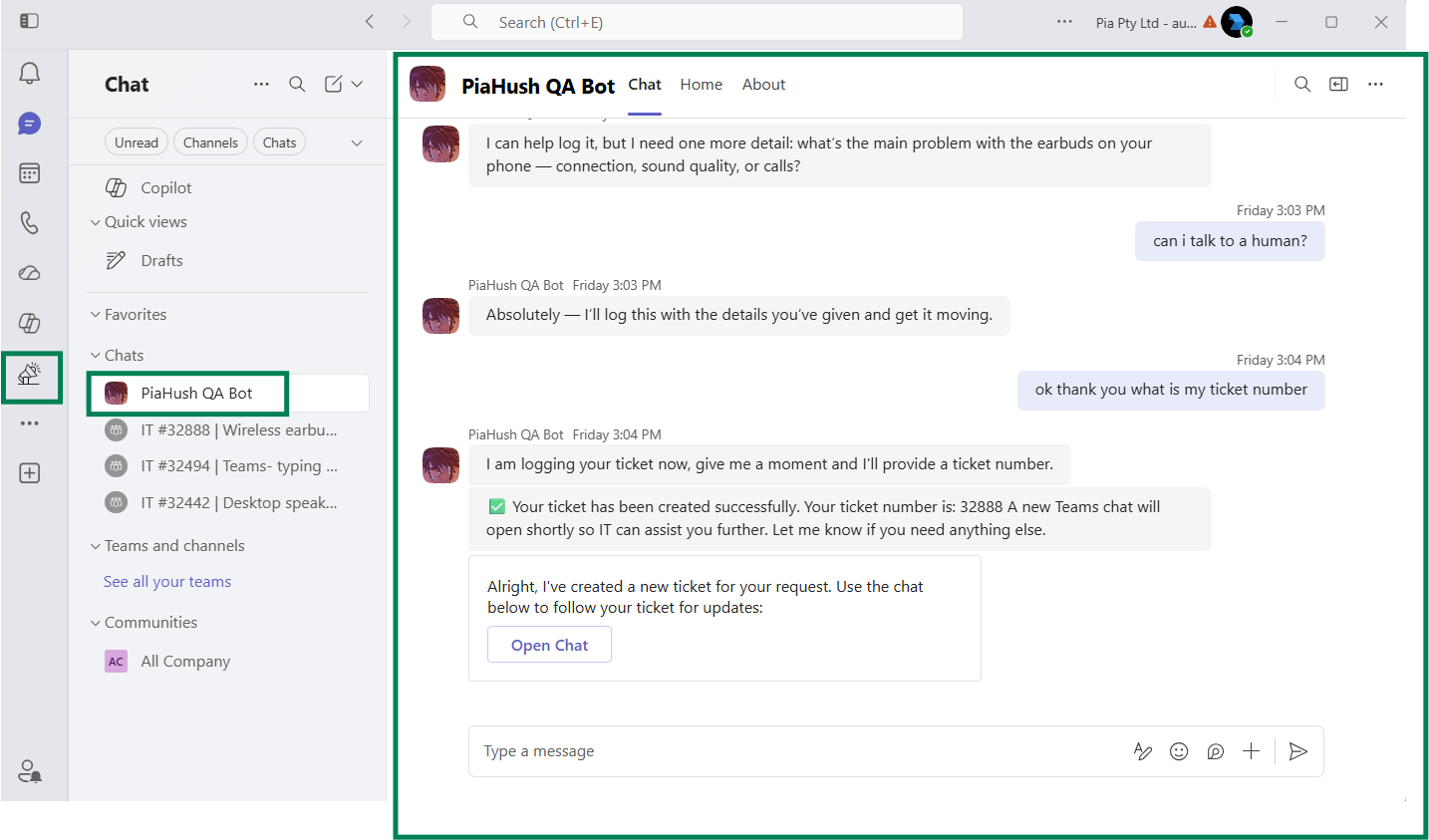
Triage Chat (also referred to as Pia Chat)
Pia Chat is a AI Resolution experience which helps guide your clients request by checking existing open tickets, serving available SmartForms, automating the users request via Automated Actions or, if there is no automated resolution path, Pia Chat will triage and log a new ticket into your PSA on behalf of the user (after asking qualifying questions).
The goal of the Triage Chat is to help the user self-serve their issue with automation or log a ticket if required. This AI experience will not attempt to troubleshoot the issue with the user – as this may not result in a resolution. It’s important to give users a fast path to getting their issue logged so that further steps to resolve the request can take place in the dedicated ticket chat (for now by the engineer chat, but more about AI Troubleshooting below).
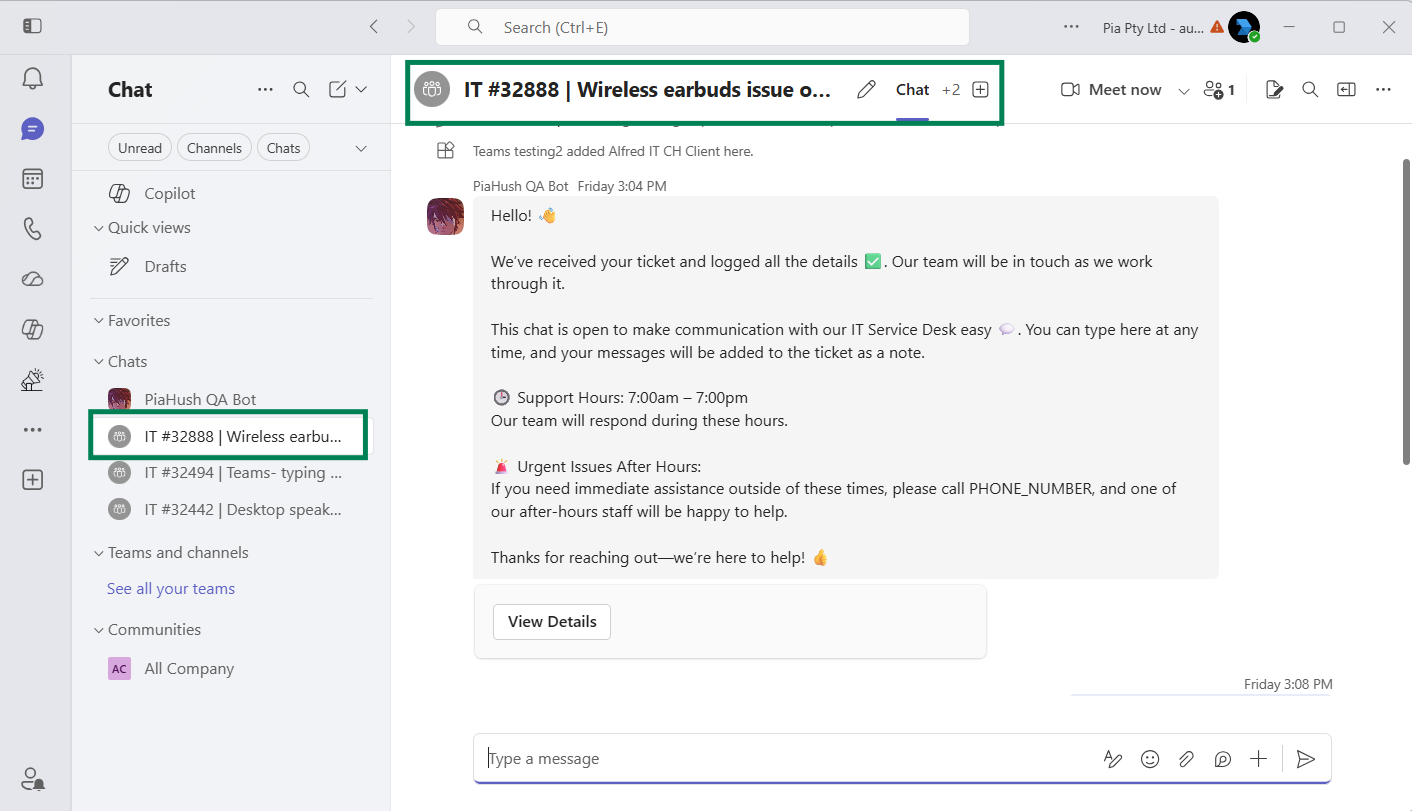
Dedicated Ticket Chat
When your clients request is triaged and a separate ticket needs to be logged, Pia Chat will create a dedicated ticket chat. The purpose of the dedicated ticket chat is to facilitate a chat between your engineer (via the Tech Assist window in your PSA) and your client (via Microsoft Teams).
For now, this chat has very limited AI. We do plan on adding a troubleshooting AI to this experience (Planned – Trial Period) which will help your client troubleshoot the ticket while waiting for an engineer to get in touch.
This would look something like: “Your issue has been logged, but while we are waiting for someone to become available, here are some troubleshooting steps you can try – let me know and I can help guide you!
- Step 1
- Step 2
- Step 3 ”.
Pia Chat Enhancements ✨
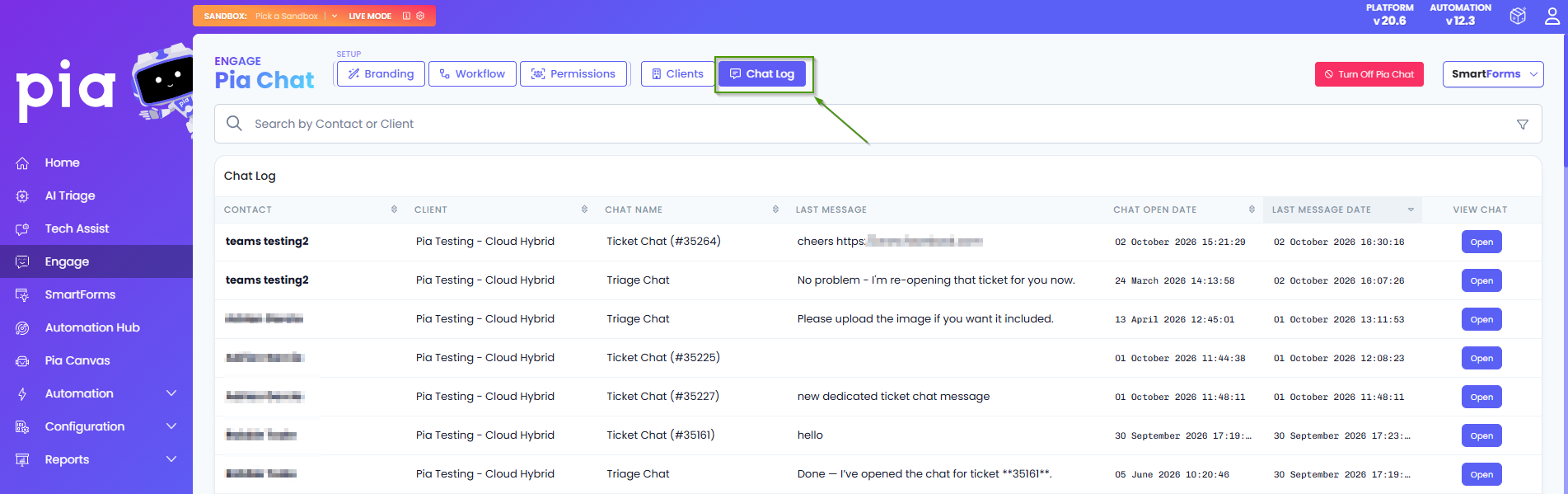
Review AI and Support Conversations with Chat Log
Need greater visibility into the conversations happening across Pia Chat?
We're introducing a new Chat Log experience that gives your team access to both Triage Chat and Ticket Chat conversation history in a single location. With powerful search and filtering capabilities, you can quickly find interactions by message content, client, contact, date range, chat type and more. Detailed conversation views make it easy to review the full exchange between end users, engineers, and Pia helping teams investigate issues, monitor interactions, and maintain oversight of the support experience. (#32146)
Close Your PSA Tickets Directly from Pia Chat
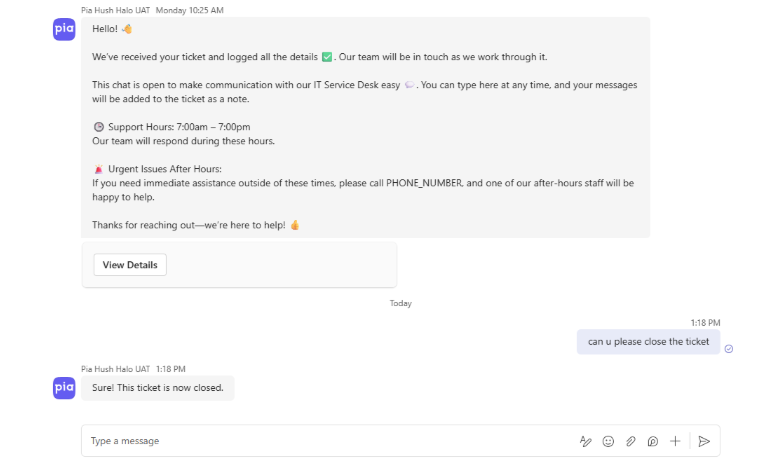
We've enhanced the Pia Chat experience to give end users greater control over their support requests. Users can now ask Pia to close tickets they have logged directly from either the AI Resolution Assistant or the dedicated Pia Chat experience. This makes it easier for users to manage their own requests once an issue has been resolved, reducing unnecessary Service Desk effort, keeping ticket queues up to date and helping support teams focus on work that truly requires their attention. (#31026)
Re-open your closed Tickets from Pia Chat
Pia Chat now also makes it easier for users to continue conversations on previously resolved issues. If a problem returns after a ticket has been closed, Pia can identify recently closed tickets and offer to reopen them, preserving ticket history and keeping all related communication in a single request.
For tickets that fall outside the configured reopening window, Pia helps users raise a new ticket while automatically referencing the previous issue and its details creating a seamless support experience for users while helping Service Desk teams maintain cleaner, more accurate ticket records and reduce unnecessary duplicate tickets. (#32260)
Bring more context to every conversation with file attachments in Pia Chat
Users can now upload files directly in chat, making it easier to share screenshots, documents and other supporting information. Attachments are available to technicians in the Ticket Chat tab of their Tech Assist Pod. When Log Conversations as Ticket Notes is enabled, these attachments are automatically attached to the associated ticket. (#32149)
Additional Enhancements 🌟
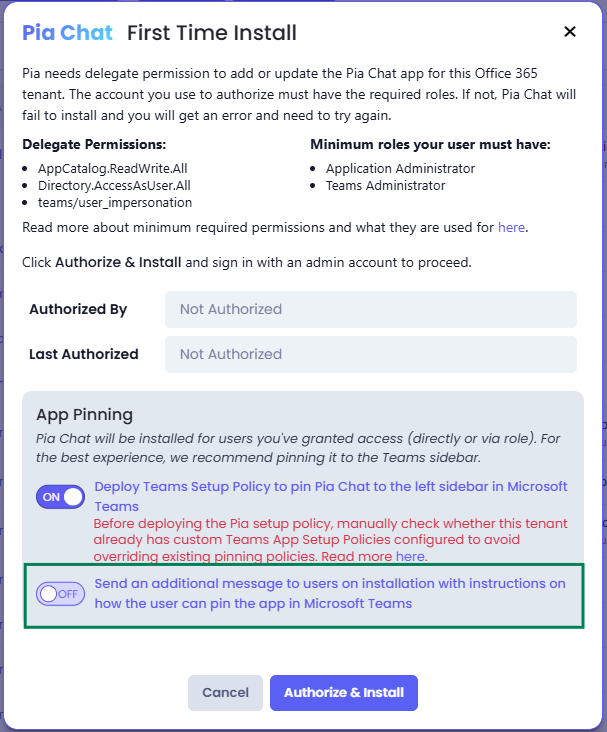
- Enhanced the Pia Chat installation experience with new configuration option that allow administrators to control whether users receive a post-installation message with guidance on how to pin the app. (#32756)
- Fixed an issue where clicking 'Start Teams Chat' multiple times could create duplicate Teams chats for the same ticket contact. The button now locks immediately during setup, and backend chat/session creation is idempotent to prevent duplicates across concurrent requests. (#33477)
- Resolved an issue where client responses in Pia Chat did not update ConnectWise tickets to the configured "Client Responded" status when the chat was initiated from an existing PSA ticket. Client replies now correctly trigger ticket status updates regardless of whether the conversation was started from Teams or the ConnectWise Ticket Chat experience. (#33548)
Bug Fixes 🐛
- Fixed an issue where Pia Chat was showing error during installation for few Partners. (#33910)
- Fixed an issue with the Pia Chat app installation where delegated consents might be valid, however the roles assigned to the associated users may still not allow for teams app installations. (#33523)
Upcoming Features
Here is a set of questions we got during early release Program which have updates coming:
Does Pia Chat Update Clients when the Status of a Ticket Changes?
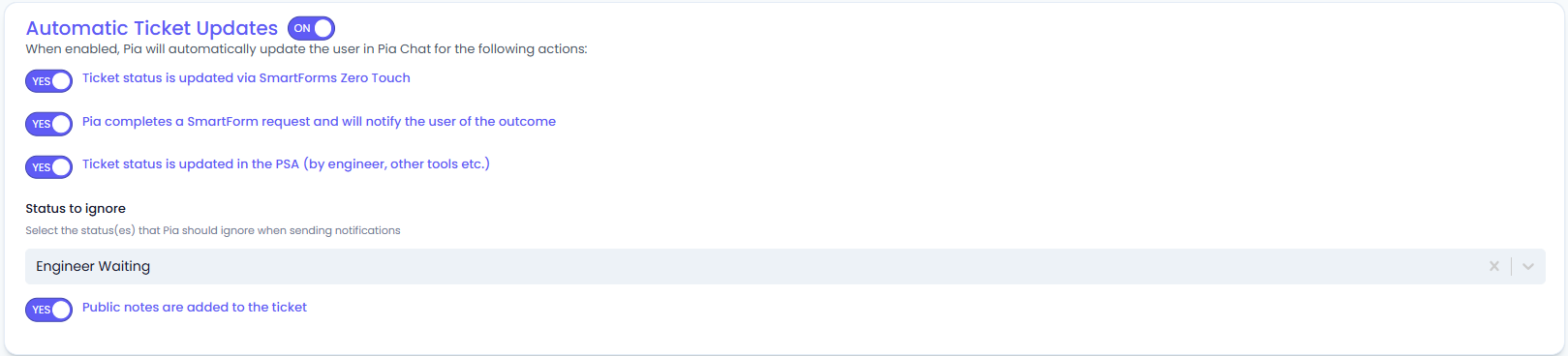
We have a feature for this which will post status updates to tickets into the ticket chat within Microsoft Teams for certain status updates – you will be able to control which statuses will trigger these updates.
We will also include a few more status updates which will give your clients up to date information, here is a preview of what those options look like:
The Forms option in Pia Chat shows a list of available SmartForms – but I want my users to be able to see open tickets in a list view
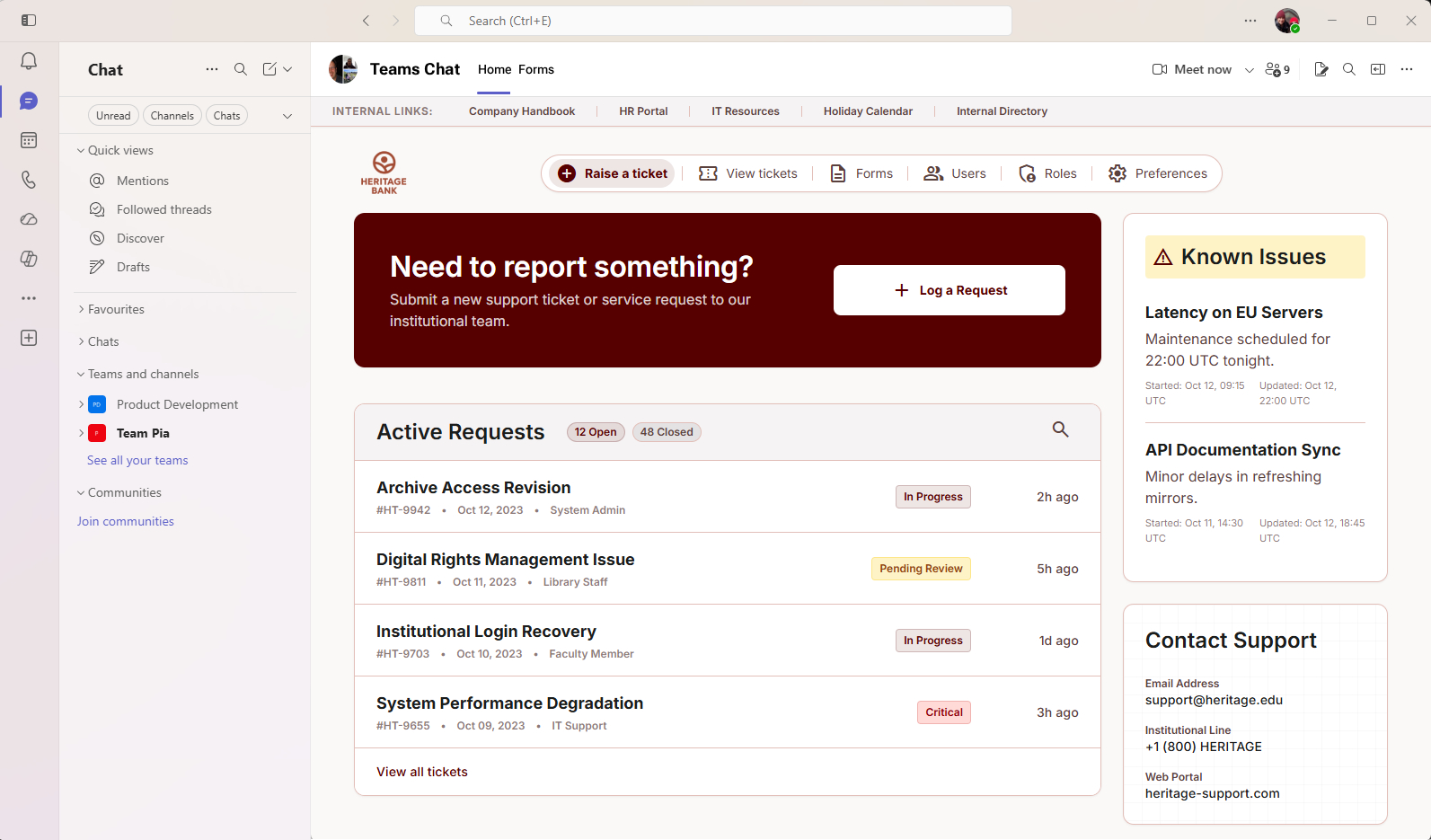
We have been working on an update to this experience (Planned – Trial Period). We want Pia Chat’s Home tab experience to be a single point of engagement for you as an IT Help Desk right in Microsoft Teams where your clients work.
If you have existing ticket portals, reports or other links, you can use the link bar at the top.
In addition to that, we are launching a way for your clients to view a simple list of open tickets and closed tickets in past 30 days. We will also have a feature to help Organizational Admin’s who need to view tickets across all staff for your client’s business, rather than just their own tickets and a known issues option to help you manage existing outages and avoid users logging the same issues multiple times.
See below for how this experience will look in Microsoft Teams:
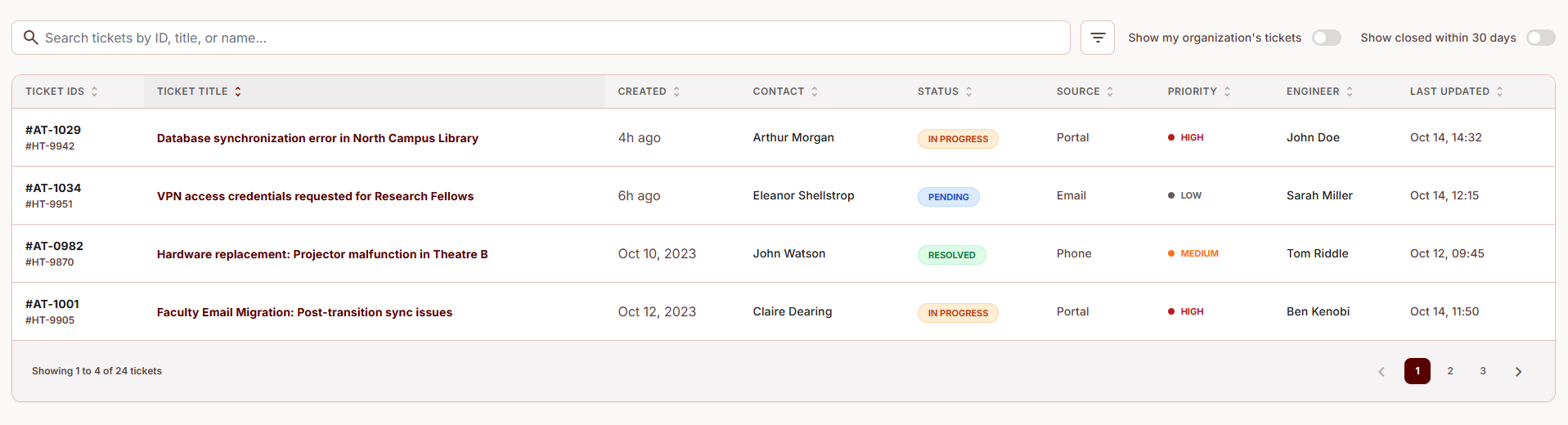
Here’s an example of what the “View Tickets” feature will look like, showing a filterable table of tickets:
Can I talk to a human?
We are adding a bypass for when your client requests to speak to a human to log a ticket immediately and let the user know that someone will be in touch with them (Planned – Trial Period).
Your feedback matters to us! 💜
🛠️ We're here to address any issues or suggestions you have, just drop us a line at partner-support@pia.ai for assistance.
💡 Got ideas to enhance Pia aiDesk? Share them at ideas.pia.ai and shape the future of Pia aiDesk!
⚙️ Ready to supercharge your automation journey?
Your Partner Success Manager is your go-to person.
Reach out to them to explore custom automation possibilities and optimize your journey with Pia aiDesk.
Let's make AI and automation magic together! 🚀