⬆️ Your Pia aiDesk tenant will be updated by the end of October.
No need to keep refreshing your Pia tenant! You will get an email with the Release Notes when you receive the latest version.
5 New Self Serve SmartForms automations! 🌟
Give your clients the ability to self serve /manage their own requests safely.
Take control of common account management tasks with our growing range of Self-Service SmartForms automations. These automations can now be used by end users to securely manage their own accounts, reducing Service Desk workload and enabling faster request fulfillment.
The following SmartForms automations now support Self-Service:
- Setup/Remove Out of Office (#32395)
- Change Calendar Permissions (#32423)
- Create or Remove Mail Forwarding Rule (#32659)
- Grant/Revoke Mailbox Permission (#32660)
- Reset Network Password (#32661)
New AI AutoStart Automation! 🌟
Computer Space Clean Up
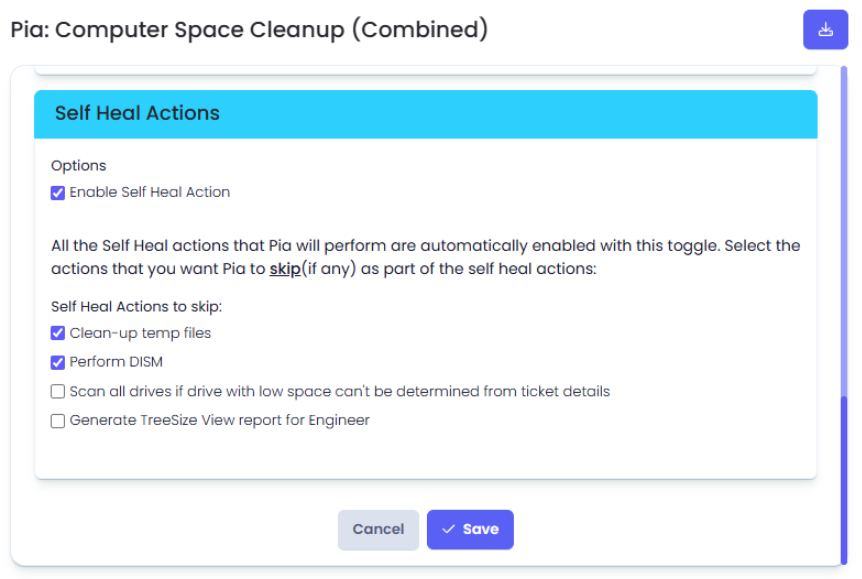
We've expanded our AI AutoStart Automation lineup with the new Computer Space Clean Up automation. Now, when a user submits a storage cleanup request, Pia can automatically detect and action the request without waiting for technician intervention. Based on the configured Self-Heal actions and the affected drive, Pia can clean up temporary files, perform a DISM cleanup on the operating system volume, and generate a TreeView report for technician review.
This helps users free up disk space and resolve storage-related issues faster, getting back to work sooner with minimal disruption while reducing the need for manual service desk involvement. (#26549)
For more information on this automation, click here.
Bulk User Offboarding Now Includes CSP License Management! 🌟
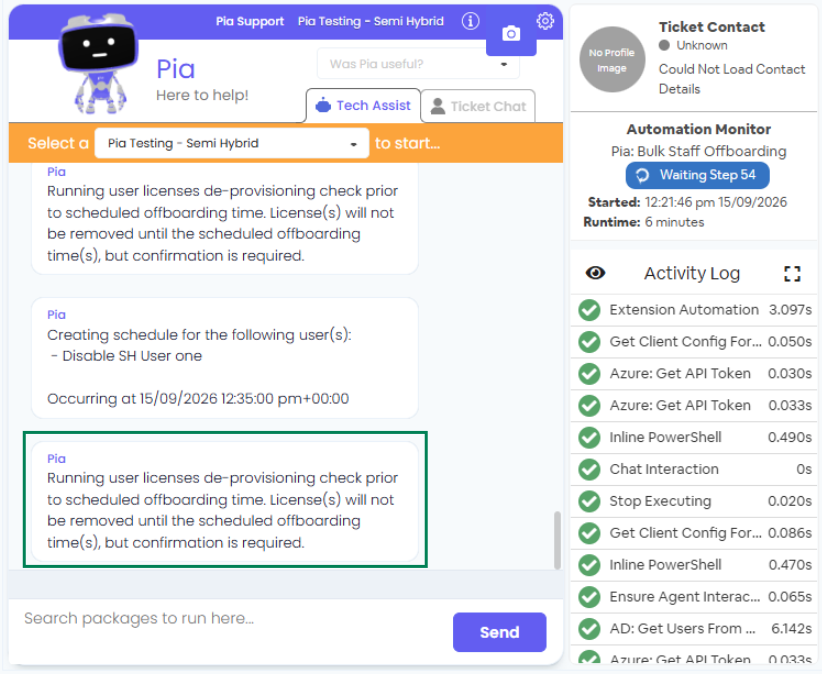
The Bulk Terminate User automation now includes CSP license de-provisioning, bringing feature parity with the standard Staff Offboarding experience. Partners can now reclaim or reduce eligible licenses as part of a bulk offboarding request, with all associated subscriptions presented in a single interaction for easy review and management. Additional safeguards have been added which includes a confirmation step before license reductions are processed, helping ensure bulk offboarding tasks are completed accurately and efficiently. (#26522)
Semi Hybrid support for SmartForms automations 🌟
We have expanded our support for the following automations to the Semi Hybrid Environments as well!
- Create or Remove Mail Forwarding Rule (#26524)
- Grant or Remove Mailbox Access (#26525)
- Setup or Remove Out of Office (#26526)
Enhancements 🌟
- Added handling for when the Microsoft MFA integration has not been configured in the tenant when attempting to run the Pia: Challenge User Identity package. (#28883)
- Added error handling for when Pia lacks the required API permissions to set the resource on a ConnectWise ticket. (#32940)
- Updated the SmartForms: Grant / Revoke Mailbox Permissions automation by making mailbox permission selection mandatory. This improvement helps reduce user input errors. (#32947)
- Enhanced Pia: Staff Offboarding automation to automatically remove delegated mailbox access permissions as part of the offboarding process, helping ensure access is revoked consistently and reducing manual cleanup tasks. (#25337)
- Added a variable to control whether the outcome of the Pia: Triage V2 automation should be appended to the ticket's notes. (#33221)
- Updated all SmartForms automations with Approval Points to be before the technician Prompts during execution, allowing the Approver to approve/deny the request prior to the technician interaction to smoothen the experience. (#32704)
- Updated the SmartForms: Staff Offboarding (Semi Hybrid) automation to include a new Both option, allowing users to terminate accounts in both On-Premises and Cloud environments within a single request. When Both is selected, separate user selection fields are displayed for each environment. (#26791)
- Improved the Pia: Bulk Update User Details automation to handle updating a large number of users. Memory utilization within the bulk update process has been optimized, improving performance and reliability when modifying user details at scale. (#31823)
- Enhanced the Pia: Computer Space Cleanup automation to better handle memory for large file deletions. (#32917)
- Enhanced the Onetime Secret - Create OTS Link Extension to work for a regionalized API base URL. Enhanced support has been added to allow integrations to use custom API base URLs ensuring the extension functions correctly across different regional deployments. (#32456)
Bug Fixes 🐛
- Resolved an issue where the Cancel function was not working as expected in the Pia: Re-allocate User License automation. (#32989)
- Fixed an issue in the Pia: Manage User Licenses automation where the litigation-hold safeguards could block pure license assignment (add-only) operations. Also corrected litigation capability comparison logic to prevent irrelevant hold prompts and improved execution messaging when license removal is skipped due to litigation/archiving policy. (#33011)
- Resolved an issue where the Pia: Staff Onboarding automation was not adding Job Title for new AutoTask Contacts. (#33030)
- Fixed an issue in the Pia: Create a Group (On Prem) automation where distribution groups were created with an incorrect email suffix. Additional handling has been implemented in the on-premises AD Distribution Group creation process to ensure the correct Primary SMTP address is assigned and retained when the group synchronizes to M365. (#33137)
- Fixed an issue where the Pia: Change User Details automation was failing due to Job title length limit constraints for AutoTask Contacts. (#33436)
- Resolved an issue in the Pia: Manage User Licenses automation where an ambiguous message may be output to the chat that there was an error removing a license when no licenses were selected to be removed from the User. (#32463)
- Fixed an issue where the Pia: Add/Remove User from Groups (Cloud Only) automation was failing to handle distribution lists with no groups. (#32945)
Your feedback matters to us! 💜
🛠️ We're here to address any issues or suggestions you have, just drop us a line at partner-support@pia.ai for assistance.
💡 Got ideas to enhance Pia aiDesk? Share them at ideas.pia.ai and shape the future of Pia aiDesk!
⚙️ Ready to supercharge your automation journey?
Your Partner Success Manager is your go-to person.
Reach out to them to explore custom automation possibilities and optimize your journey with Pia aiDesk.
Let's make AI and automation magic together! 🚀
We hope these enhancements improve your experience and streamline your workflows. Stay tuned for more updates and new features in future releases. As always, your feedback is invaluable to us. Please don't hesitate to reach out with any questions or suggestions.
Thank you for choosing Pia aiDesk as your automation platform of choice!
The Pia Product Team